

Make complex technical documents instantly searchable
A powerful search solution that delivers relevant, easy-to-understand answers from PDFs, API specs, manuals, and release notes. Enable technical users to find what they need, without raising a ticket or opening a 300-page PDF.
API Reference
OpenAPI, Swagger, GraphQL schemas
PDF Manuals
Installation guides, hardware specs
Release Notes
Changelogs, deprecation notices
SDK Documentation
Code samples, method signatures
Technical FAQs
Error codes, troubleshooting guides
Word / Office Docs
Internal runbooks, SOPs
60%
of developer support tickets are questions already answered in existing documentation
12+
document and file formats indexed automatically without manual conversion
4×
faster time to answer for technical users compared to manual doc navigation
Search built for technical complexity
Keyspider understands the structure of technical documents, headings, code blocks, version numbers, and error codes, delivering precision results that generic search engines miss.
Index any document type
PDFs, Word documents, API specs, OpenAPI/Swagger files, release notes, changelogs, and technical manuals, all indexed alongside web pages and searchable from one bar.
Developer-friendly search
Code-aware indexing means function names, error codes, and CLI flags are searchable. Developers find what they need without reformulating the query.
Faceted filtering by document type
Let users filter by content type, API reference, tutorial, release note, or manual. Reduce noise and surface the most relevant format for the user's current task.
As-you-type for technical terms
Autocomplete understands domain-specific terminology, product names, and version numbers. Technical users get precise suggestions, not generic web-search guesses.
From complex documents to instant answers
Connect your documentation sources
Point Keyspider at your docs site, S3 bucket, SharePoint, or any URL. The crawler extracts text, code blocks, and metadata from every file type it encounters.
Structure the search experience
Configure facets by product version, document type, or audience (developer vs. admin vs. end user). Guide users to the right format as well as the right answer.
Embed in your developer portal
Use the JS widget or API to add search to your docs site, API reference, or internal wiki. Zero infrastructure overhead on your side.
Measure documentation coverage
Analytics reveal which technical terms return zero results, pointing your docs team to exactly where coverage is missing.
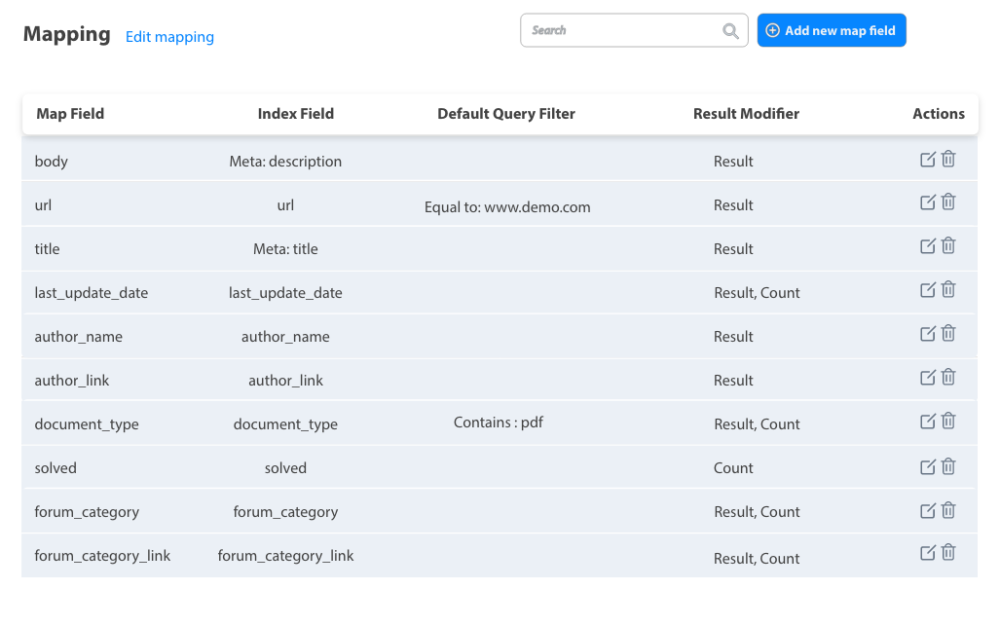
Configure field mapping and indexing rules for each document type
Built for technical users
Software developers
Find method signatures, error codes, and integration examples without leaving the IDE workflow.
Technical support agents
Resolve complex cases faster with instant access to manuals and API specs from inside the case view.
System administrators
Navigate installation guides, runbooks, and configuration manuals at speed, even across different product versions.
Ready to give your users better answers?
AI Search, AI Assistant, and Workplace Search. Deployed in days, not months. See it live on your own content.
No credit card required · Live in 2 weeks · Cancel anytime