

Your FOIA Backlog Isn't a Staffing Problem. It's a Search Problem.

Every FOIA officer has lived this: a request lands, the statutory clock starts, and the actual work begins. Not reviewing documents. Not applying exemptions. Finding the documents in the first place. Checking the email archive. Searching SharePoint. Asking three departments if they have anything responsive, then waiting. The legal analysis is often the fast part of the job.
We've measured this pattern across dozens of state and local FOIA and public records deployments: the average agency spends 4.2 hours per request on document discovery before legal review even starts. For an office processing 200 requests a month, that's 840 staff hours, roughly five full-time employees, spent entirely on retrieval rather than the substance of records law compliance. FOIA document search is a solvable problem, and public records offices procuring through GSA MAS or NASPO ValuePoint don't need a standalone RFP to fix it.
How Long Does FOIA Document Discovery Actually Take?
Most state and local agencies spend between 3 and 6 hours locating responsive records for a single moderately complex request, before any review or redaction begins. That number climbs sharply when responsive material spans multiple departments, legacy systems, or file formats the requester never sees.
Why Document Discovery Eats the Clock
The discovery problem has three layers, and none of them are staffing. The first is fragmentation. Responsive documents live in email archives, SharePoint sites, shared drives, ERP systems, departmental file servers, and individual employees' desktops. There is no single place to search that covers all of it, so a FOIA officer becomes an unpaid systems archaeologist for every request.
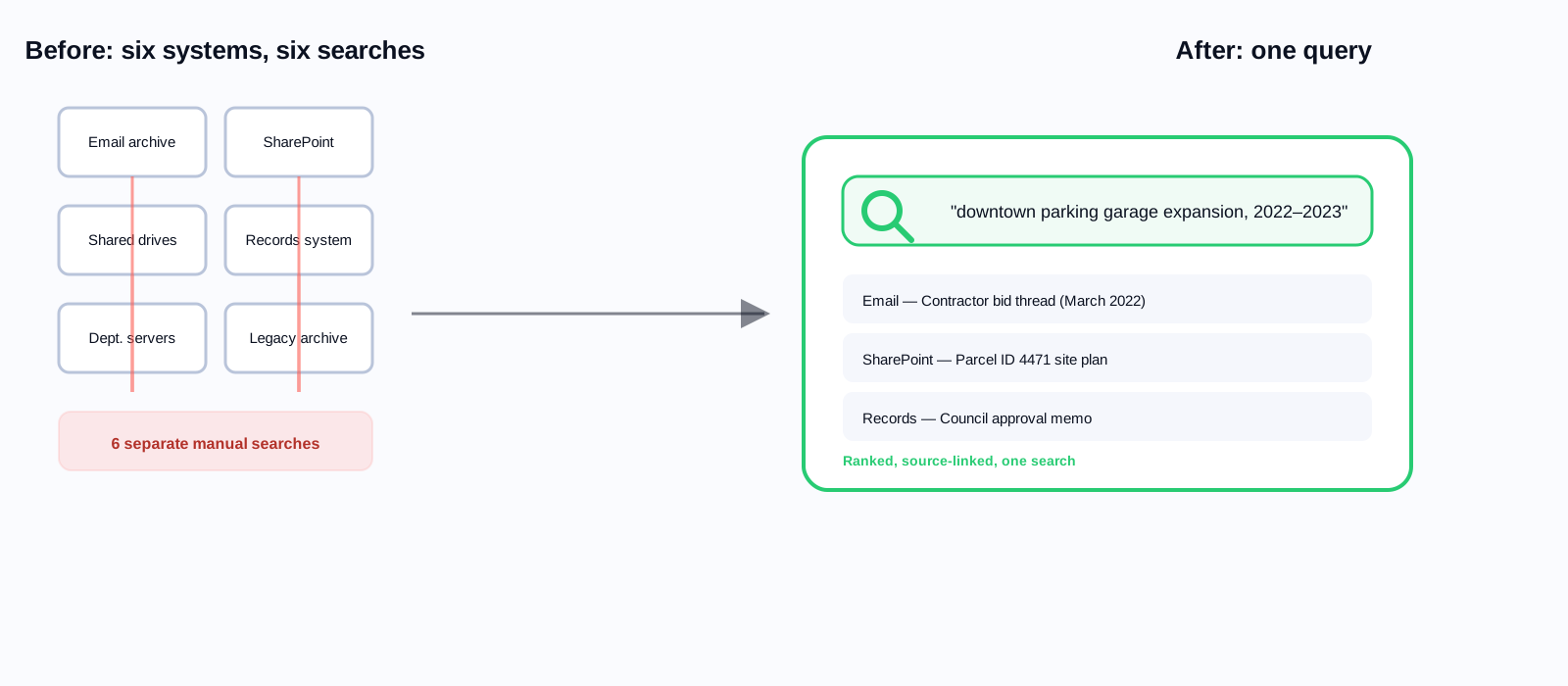
The second is specificity. Requesters describe documents in plain language, not the agency's internal filing terms. A request for 'all communications about the downtown parking garage expansion' has to match against a project number, a parcel ID, a contractor name, and a department abbreviation the requester has never heard of. Keyword search against that kind of query fails constantly, because the words in the request and the words in the file rarely match.
The third is date-range complexity. Responsive material can span years and multiple system generations. A 2019 email might sit in a legacy archive nobody actively searches anymore. A FOIA officer who doesn't know that system exists never finds the record. One who does know spends hours digging through it by hand.
What Workplace Search Does to the Discovery Problem
Workplace Search deployed across the email archive, SharePoint, shared drives, and document management systems collapses discovery into one natural-language query. A FOIA officer types "all communications about the downtown parking garage expansion from January 2022 to March 2023" and gets a consolidated, citation-linked list of responsive documents pulled from every connected system, ranked by relevance, with the source location attached to each result.
That's not a roadmap item. It's what AI-powered workplace search delivers today in live FOIA workflows at state and local agencies. The technology isn't the constraint. Whether the relevant systems are indexed is.
We went from an average of four hours to find documents down to about 45 minutes. Not because we lowered our legal review standards. Because we stopped hunting. We type a query, see what exists, and start the actual legal work.
FOIA coordinator, county government serving roughly 340,000 residents
What Is the Statutory Risk of a Slow FOIA Response?
Every state sets a statutory response deadline for public records requests, typically 5 to 10 business days for acknowledgment and 20 to 30 for full response. Agencies that miss these deadlines routinely face court-ordered compliance, statutory penalties, and public criticism from requesters who publicize the delay.
When discovery alone takes 4 or more hours per request, deadline compliance at any meaningful volume requires either heavy staff investment or chronic non-compliance. Most agencies land on the latter, not by choice but by arithmetic. Cutting per-request discovery time to under an hour changes what's achievable with the staff already on payroll.
What Does Slow Discovery Actually Cost the Agency?
Run the math on a blended records-staff cost of $45 an hour, fully loaded. At 4.2 hours of discovery per request and 200 requests a month, that's roughly $37,800 a month, or about $453,000 a year, spent purely on locating documents. Cut discovery to 45 minutes and the same volume costs about $67,500 a year. The difference doesn't require new headcount. It requires the systems your staff already touch to be searchable from one box instead of six.
That number doesn't include the cost of the requests that go late. Court-ordered compliance actions, statutory penalties in states that impose them, and outside counsel fees for records-law litigation routinely run into the tens of thousands of dollars per incident. A single missed deadline that escalates to a compliance order can cost more than a year of discovery-time savings would have prevented.
Isn't This the Same as the Search My Records System Already Has?
Most records management systems and document repositories ship with a built-in search box, and most FOIA officers have already tried it and moved on. That search is full-text keyword matching scoped to whatever's stored in that one system. It doesn't reach the email archive, the shared drive, or the department that keeps everything in a folder structure nobody documented. It also can't handle the terminology gap: a requester's plain-language description rarely matches the filing language a department actually used.
Workplace Search is not another repository to check. It's a layer that sits across every system you already have, understands intent rather than exact keywords, and enforces the same permissions each source system already has in place. The difference shows up the first time a FOIA officer searches once instead of six times.
Access Controls Are Not Optional
A FOIA officer searching for responsive documents should never, in the process, see material outside the scope of the request or their own access permissions. Any AI search system used for records processing has to enforce the exact same access controls as the underlying source systems. This isn't only a privacy concern. It's a litigation concern. Producing documents in a response that were surfaced without proper permission filtering, and that were never actually responsive, creates real legal exposure for the agency.
What to require in a FOIA-ready search system
Permission inheritance from source systems is non-negotiable. The search layer must enforce the same access controls as SharePoint, the email archive, and every other connected system. Audit logging of every query submitted and every document accessed is equally essential. That log is your evidence the discovery process was conducted properly if a denial or a scope dispute is ever challenged.
The Requester Portal Angle Most Agencies Miss
There's a second, frequently overlooked side to AI search and FOIA volume: the public-facing website. A meaningful share of records requests are for information that's already published on the agency's site but can't be found through the site's search. Residents file formal requests for public documents because they can't locate them any other way.
Agencies that deploy AI Search on their public website see FOIA volume drop in the first 90 days, typically 15 to 25 percent. The mechanism is simple: people who can find public information through search stop filing formal requests for it. Every eliminated routine request frees staff hours for the genuinely novel ones. Run the math for your own office with the findability tax calculator; most local government sites we've reviewed are paying more for poor search than they'd pay to fix it.
4.2 hrs
average time per FOIA request spent on document discovery
45 min
typical discovery time with Workplace Search deployed
15–25%
reduction in FOIA volume after public AI Search deployment
60–80%
reduction in processing time with AI-assisted discovery tools
Read next
Institutional knowledge scattered across departments doesn't just slow FOIA. It slows everything. Our whitepaper on the government knowledge crisis covers the full cost of fragmented systems, and what a unified search layer actually fixes.
Getting Started: Where to Index First
Not every document system deserves equal priority. Start with the email archive, where most substantive inter-departmental communication lives, then SharePoint or Google Drive, where project and program documentation accumulates, then your records management system if you have one. Departmental file servers and legacy document stores come second.
One caveat before you index anything: FOIA-purpose indexing needs a written policy on what the search layer can access and which queries by records staff are logged. Build that governance policy first. Access control and audit trail requirements have to be designed into the deployment from day one. Retrofitting them later is expensive and, in a records-law context, risky.
Budget a short training session for records staff before rollout, not after. The interface change from six search boxes to one is simple, but the habit of checking three systems manually is not. Most agencies see full adoption within two to three weeks once staff trust that the consolidated results are actually complete.
Related reading
If your office processes more than 100 requests a month, book a demo and we'll show you what Workplace Search finds in your own systems on a live pilot.
Ready to see it in action?
Book a demo and we'll configure Keyspider on a live sample of your content, within 48 hours.
Book a Demo