

Copilot Made Your Documents Easier to Draft. Not Easier to Find.

A lot of agencies rolled out Microsoft Copilot expecting it to quietly fix the SharePoint search problem along the way. Staff can now draft a memo faster, summarize a long policy document in seconds, and generate a first pass at a report. What most of those same staff still can't do: find the actual document they're looking for when someone says "there's a policy on this somewhere, I just don't remember where."
That's not a Copilot failure. Copilot was built to help you work with documents once you've found them, not to solve the underlying findability problem across a scattered, multi-system document environment. SharePoint's native search, the thing actually responsible for locating documents, is the same tool it's been for years, and it was never good at cross-system, intent-based search to begin with.
Why Didn't Microsoft Copilot Fix SharePoint Search?
Copilot works within the boundaries of Microsoft 365's existing index, which means it's scoped to what SharePoint, Outlook, and OneDrive already know about, and it inherits the same keyword-matching limitations native SharePoint search has always had. It doesn't reach into ServiceNow tickets, Salesforce records, Google Drive folders left over from a pre-Microsoft era, or the department that still keeps everything in a shared network drive nobody renamed since 2016.
The Real Problem Was Never SharePoint Alone
Most government agencies don't run one system. They run SharePoint for some departments, a legacy shared drive for others, ServiceNow for IT tickets, Salesforce or a case management system for constituent services, and email as the de facto archive for everything nobody filed anywhere else. A new hire in a department with three years of institutional knowledge scattered across five systems doesn't have a SharePoint problem. They have a "which of five systems do I even start searching" problem, and Copilot doesn't touch four of them.
We wrote about the productivity cost of this fragmentation in detail in our post on workplace search ROI and information silos. The short version: employees report spending a meaningful chunk of their week just locating information they know exists somewhere, and that cost doesn't show up on any budget line because it's distributed across every employee's day rather than concentrated anywhere obvious.
5+
typical number of separate systems institutional knowledge is scattered across in a mid-sized agency
20%+
of a typical knowledge worker's week spent searching for information rather than using it
1
unified search bar needed instead of five separate ones
What Would Actually Fix This?
A search layer that indexes across every system an agency actually uses, not just what Microsoft 365 already covers, enforces the same permissions each source system already has, and understands intent rather than exact keyword matches. That's a different tool than Copilot, doing a different job, and agencies that expected one to replace the other are the ones still frustrated a year into their Copilot rollout.
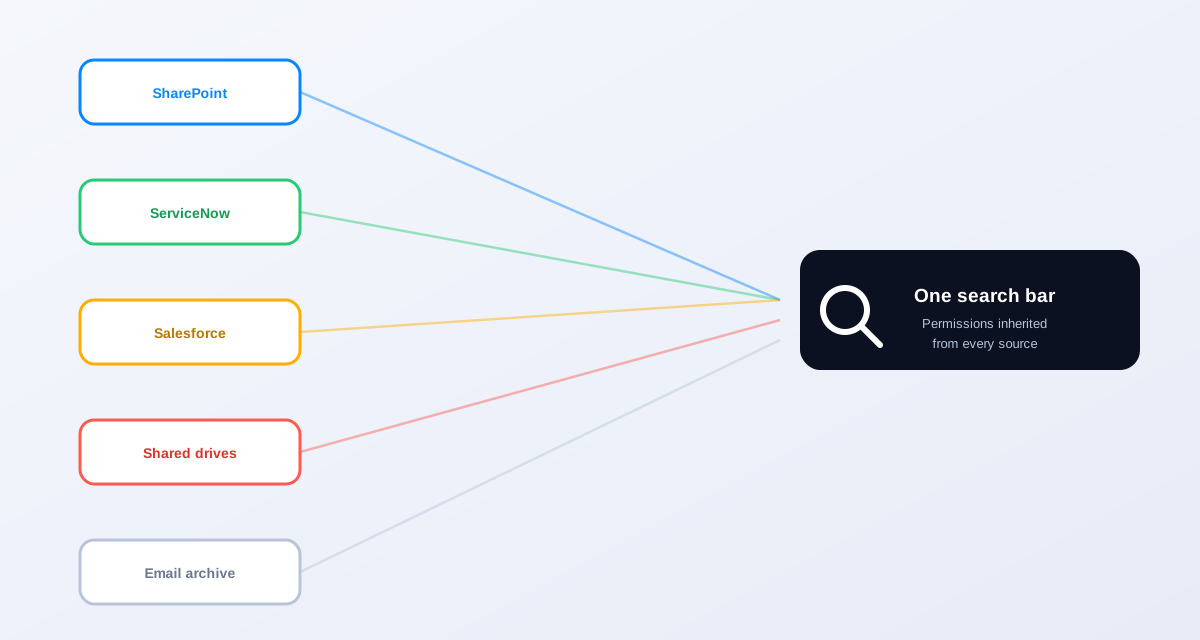
How Workplace Search Closes the Gap Copilot Leaves Open
Workplace Search connects to SharePoint, ServiceNow, Salesforce, shared drives, and the other systems an agency actually runs, and puts one search bar in front of all of it. An employee types a plain-language question, not a guess at the exact filename or the department's internal terminology, and gets results ranked by relevance across every connected system, with the source and location attached to each result.
This isn't a replacement for Copilot. Most agencies run both. Copilot helps staff draft and summarize once they have the right document in front of them. Workplace Search gets them to the right document in the first place. Treating them as competing tools misses what each one is actually built to do.
Copilot was a real productivity win for drafting and summarizing. It did nothing for the 'where is this document' problem, because that was never what it was built for. Once we added a search layer across all five of our systems, that's when new hires actually stopped asking three people the same question every week.
IT director, county government serving approximately 340,000 residents
Access Controls Have to Carry Over Exactly
Any search layer sitting across multiple systems has to enforce the exact same permissions each source system already has. An employee searching for HR policy documents should never surface a personnel file they don't have access to, regardless of which system it happens to live in. Permission inheritance from every connected source system is a non-negotiable requirement, not a nice-to-have feature, for any government deployment.
What Deployment Actually Looks Like
Connecting Workplace Search to SharePoint, ServiceNow, Salesforce, and shared drives typically takes two to six weeks depending on how many systems are in scope and how consistent existing permission structures already are. SharePoint and most modern SaaS platforms connect through native API integrations. Legacy or custom systems without a clean API sometimes need a lighter-touch connector, similar to how a web crawler indexes a public site, which still works but with a narrower feature set than a full API integration provides.
Rollout works best staged by system, not all at once. Start with the two or three sources staff complain about most, usually SharePoint plus whatever secondary system holds project or case documentation, prove the value with a visible before-and-after, then expand. Agencies that try connecting everything on day one tend to spend months in configuration before anyone sees a result. Agencies that start narrow see staff adoption within the first month.
Security Questions Worth Asking Any Vendor
A search layer that touches every system an agency runs also needs real security scrutiny, not a rubber stamp. Ask how the vendor handles encryption in transit and at rest, how often permission syncs run against source systems (stale permissions are a real risk if syncs lag), and what happens to indexed content if a connected system revokes access. The answers should be specific. "We take security seriously" is not an answer. "Permissions sync every 15 minutes and revoked access removes indexed content within one cycle" is.
- How frequently do permission syncs run against each connected source system?
- Is content encrypted both in transit and at rest, and what specific standard is used?
- What happens to previously indexed content if a document's source permissions change or the document is deleted?
- Does the vendor's hosting model match your agency's data residency requirements?
Change Management Matters More Than the Connectors
The technical integration is rarely what determines whether a cross-system search deployment succeeds. Adoption is. Staff who've spent years developing workarounds, keeping a personal bookmarks folder, asking the same three colleagues, defaulting to email search because at least they know how that works, don't change habits just because a better tool exists. Communicate the launch specifically: show staff a real search they've struggled with before, run it live, and let them see the result land in seconds across systems they'd normally check one at a time.
Expect an adoption curve, not a light switch. Most agencies see meaningful voluntary usage within two to three weeks once a critical mass of staff has tried it once and gotten a real result. Track usage by department early on. A department with low adoption usually means either their key systems aren't connected yet or nobody on that team has been shown a search relevant to their actual work.
The "Ask Dave" Problem Doesn't Solve Itself With Better Drafting Tools
Every agency has some version of Dave: the person who's been there fifteen years and just knows where everything is. That's not a knowledge management strategy, it's a single point of failure, and it gets more dangerous every year Dave gets closer to retirement. Better AI drafting tools don't touch this problem at all. A searchable, unified index across every system does, because it makes institutional knowledge findable by anyone, not just retrievable from the one person who remembers where it's filed.
This connects directly to a broader workforce trend worth watching: government agencies are losing experienced staff to retirement and attrition faster than they're replacing that institutional knowledge. Our ebook on employee knowledge discovery covers what's actually walking out the door and what to do about it before it does.
What to check before assuming Copilot has this covered
Ask your team a specific question: can they find a document from a department other than their own, in a system other than SharePoint, without asking a colleague? If the honest answer is no, Copilot hasn't solved your findability problem, no matter how good it's gotten at drafting.
Related reading
If your staff are still asking three people to find one document, book a demo and we'll show you Workplace Search running across your own systems.
Ready to see it in action?
Book a demo and we'll configure Keyspider on a live sample of your content, within 48 hours.
Book a Demo