

Field Weight
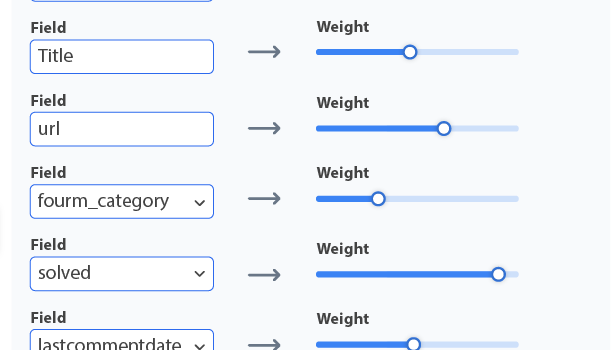
Not all fields are equal. A match in a page title means more than a match in a footer. Keyspider's field weight configuration lets you assign importance scores to any indexed field, so relevance ranking reflects your content structure, not a one-size-fits-all algorithm.
How it works
Identify your most important fields
Review your content structure. For most sites, the page title and H1 heading carry more signal than body text. For product catalogs, SKU and category may matter most.
Set weight values in the admin console
Assign a numeric weight (e.g. title: 10, body: 3, tags: 5) to each field. Higher numbers push title-matching results above body-only matches.
Test with live queries
Use the built-in query tester to preview how results shift. Adjust weights iteratively until the ranking reflects what your users actually need first.
Use cases
Knowledge base search
Weight article titles and resolved-flag fields higher so the most relevant, confirmed solutions appear before tangentially related discussions.
E-commerce catalogs
Boost product name and SKU fields so exact-match product searches surface the right item immediately, ahead of category pages or blog posts.
Government & public sector
Weight service names and department fields to surface the correct service page before supporting documents or news articles.
Ready to give your users better answers?
AI Search, AI Assistant, and Workplace Search. Deployed in days, not months. See it live on your own content.
No credit card required · Live in 2 weeks · Cancel anytime