

Court Websites Weren't Built for the Public. AI Search Fixes That
There is a moment on almost every state court website where you can feel a decision being made. It is the moment the search interface loads. Every attorney using the site knows what they need: case number, docket number, party name, filing date. Every self-represented litigant is staring at a search box wondering what a 'CV-2024-01844-CH' actually looks like and whether they should type in 'my divorce case'. The site was designed for one of these audiences. Guess which one.
The judicial branch has one of the toughest search problems in all of government. The volume is enormous. The vocabulary is highly technical. The audience is bimodal: half the users are trained professionals, half are members of the public who have never seen a court website in their life. And the accuracy stakes are real: a resident who cannot find the correct hearing date does not just have a bad user experience, they may lose the case by default.
Why Court Search Has Been Broken for So Long
Most court search interfaces have been broken for a specific structural reason. They were built as thin layers over case management systems that were designed for internal court operations, not public search. The taxonomy, the field labels, and the query patterns all reflect the internal system's data model rather than the questions the public actually asks. A member of the public who does not know that 'CH' is the code for chancery division has no way to filter effectively.
The other structural problem is that the content of a court website is not really the pages, it is the case documents. A member of the public trying to understand their own case wants information from the filings and the orders, not from the general 'about the courts' pages. Traditional site search does not index case documents, or it indexes them in a way that returns thousands of PDFs with no way to distinguish among them.
I was searching the state court site for hours trying to find out when my custody hearing was. I could not figure out what the search box wanted from me. I ended up calling the clerk's office and waiting 40 minutes on hold. The information was on the site the whole time. I just could not get to it.
Self-represented litigant, quoted in a state court access-to-justice review
What AI Search Changes for the Judicial Branch
AI search removes the requirement that the user speak the court's vocabulary. A member of the public typing 'when is my traffic court hearing' gets pointed to the hearing schedule for their case if they are logged in, or to instructions for looking it up if they are not. An attorney typing 'CV-2024-01844-CH' gets a direct match on the docket, exactly as they expect. Same search box. Same underlying content. The AI decides which interpretation applies.
The other change is the ability to synthesise across documents. A resident asking 'what is a motion to dismiss and do I need to respond to one' gets a plain-language answer sourced from the court's own procedural guides, with links to the specific forms and filing deadlines. This is the type of question that clerks' offices field constantly and that the website was theoretically supposed to answer.
The Three Audiences a Court Website Actually Serves
1. Practicing Attorneys and Court Staff
These users know exactly what they are looking for. They want direct docket lookup, case status, filing acceptance timestamps, e-filing system access, and quick reference to local rules. Their search behavior is short, precise, and metadata-driven. AI search serves them by preserving the fast lookup path while adding fuzzy match for typos and partial docket numbers.
2. Self-Represented Litigants
Roughly 75% of civil cases in state courts now involve at least one self-represented party. These users have never used a court website before, do not know legal vocabulary, and are often under significant stress. Their search behavior is exploratory and conversational. AI search serves them by translating natural language into the underlying court taxonomy, and by returning synthesised answers with citations to the relevant procedural rules and forms.
3. Journalists, Researchers, and the General Public
This audience is looking for information about specific cases of public interest or aggregate information about court operations. Their search behavior is variable. AI search serves them by supporting both keyword lookup and question-style queries, and by returning structured summaries where appropriate.
75%
of state civil cases involve at least one self-represented party
3.5M
civil filings annually in the average large state's trial courts
62%
of self-represented litigants report they could not find what they needed on their court website
40+ min
average clerk-office wait time for the calls generated by unanswerable court website questions
100+
distinct case type codes in the average large state's court information system
$12–18
estimated per-call cost of a clerk-office call answering a public search question
The Non-Negotiable Requirements for Court AI Search
Accuracy Cannot Compromise
A court website that returns the wrong hearing date is not just a bad user experience. It has due process consequences. AI search deployed on court content must be grounded in the actual court record, must cite the source document, and must show timestamps of when the source was last updated. Any answer the AI cannot support with a specific document should surface as 'contact the clerk's office' rather than a confident-sounding guess.
Sealed and Redacted Content Must Stay That Way
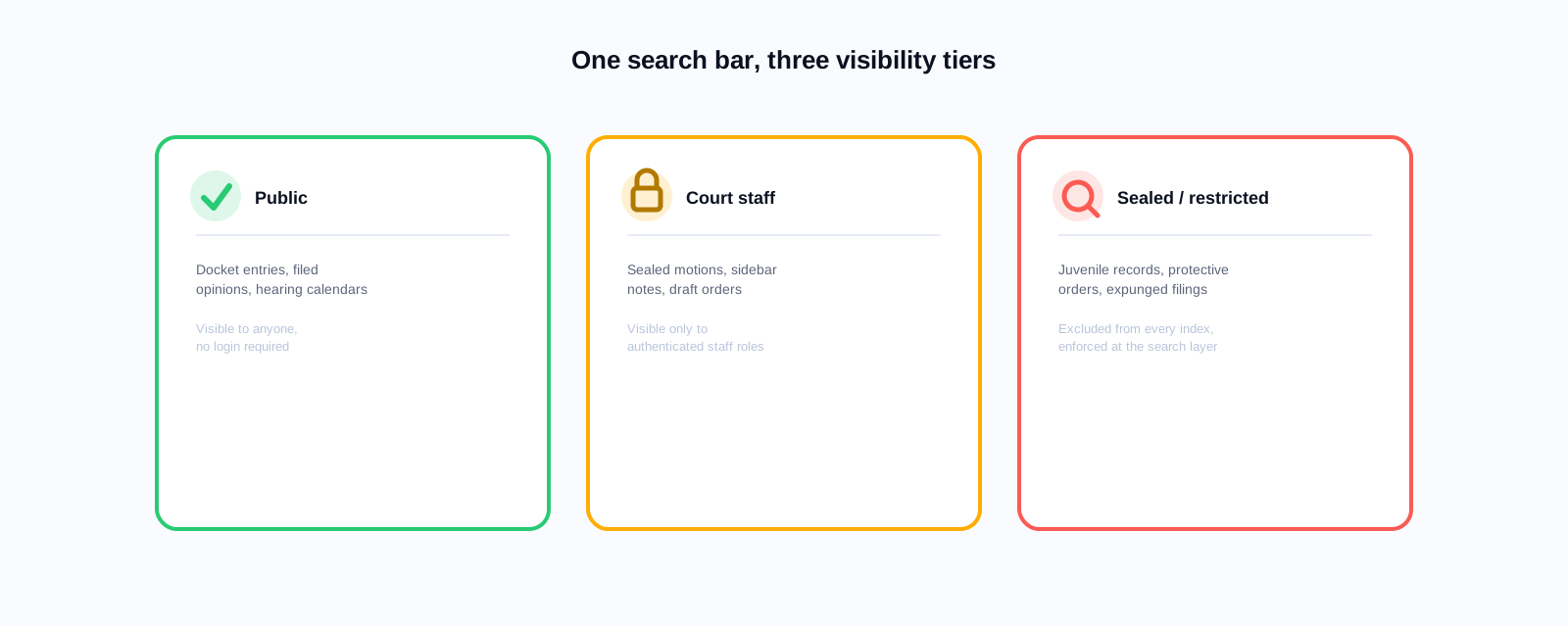
Court records include sealed cases, redacted filings, and confidential family court matters. AI search must respect access controls at the document level. The index must know which documents are public, which are restricted to parties, and which are entirely sealed. A search that surfaces content from a sealed case is a compliance failure, regardless of how relevant that content might be to the query.
Multilingual by Default
Court proceedings serve residents of every language background, and the parties least likely to have legal representation are often the parties least served by English-only interfaces. Court AI search should accept queries in any language spoken meaningfully in the jurisdiction, and should respond in the language the query was submitted in. This is a fair-access issue, the same one driving multilingual chat requirements in county and city government more broadly.
Explainability for the Public
When the AI provides an answer to a procedural question, it should explain where the answer came from and offer the user a path to talk to a person if the situation is complex. Courts should not deploy AI in a way that substitutes for judicial or clerical guidance in genuinely complex situations. The tool should be triaging, not adjudicating.
What Deployment Actually Looks Like
Court AI search deployment usually starts with the public-facing content: procedural guides, forms, local rules, self-help materials, and the general navigation of the court website. This is the low-risk, high-impact starting point. Once the AI is working well on the general content, phase two adds indexing of published opinions and orders, which are already public but poorly searchable.
Phase three is docket lookup integration. This is more complex because it requires connecting the AI to the case management system with the correct access controls. Some courts do phase three as an add-on for logged-in attorneys first, then extend to registered public users. Some courts never do phase three at all and keep the docket search as a separate authenticated interface.
Access-to-justice framing matters
The most successful court AI search deployments frame the project not as 'better search' but as 'access to justice'. Framing it that way unlocks different funding sources (bar foundation grants, legal aid partnerships, court modernisation funds) and shifts the internal debate from 'do we have budget' to 'this is core to what we exist to do'.
The Procurement Path for the Judicial Branch
The judicial branch has procurement rules distinct from the executive branch in most states. Courts often have their own IT procurement authority and their own contract templates. This can slow down evaluation cycles, but it also means courts are not stuck waiting for state-wide contract vehicles. Keyspider is available through Carahsoft on GSA MAS, which many state court systems can purchase against directly.
The evaluation criteria for court AI search should include the Government AI Chatbot Procurement Checklist, plus court-specific additions: document-level access controls, case management system integration path, and evidence of prior deployment in judicial branch settings or comparably sensitive environments.
Bring this to your next vendor meeting
Download the Government AI Chatbot Procurement Checklist: 44 questions built for exactly this kind of sensitive, high-stakes deployment.
Look at Your Self-Help Section First
Look at your court's self-help section analytics for the last 90 days. How many visitors bounce from that section without clicking through to a form or a page? Every bounce is a phone call the clerk's office is about to receive. That is the volume AI search is competing with.
Related reading
See how AI search would handle your court's actual dockets and self-help content: book a demo.
Ready to see it in action?
Book a demo and we'll configure Keyspider on a live sample of your content, within 48 hours.
Book a Demo