

A Website Redesign Without Fixing Search Is Just New Paint
A government website redesign usually starts with a navigation audit, a brand refresh, and a WCAG 2.1 AA accessibility review. It produces a new homepage, a reorganized information architecture, and a CMS migration that runs twice as long as projected. Six months after launch, the front office is fielding the same calls. The search bar still returns the wrong results. Residents still can't find the form they came for.
We've watched this pattern play out across dozens of redesign projects procured through GSA MAS and NASPO ValuePoint, and it's not because the teams running them do bad work. It's because search almost always gets treated as a setting to configure after the redesign ships, instead of the primary way residents actually navigate the site. Navigation gets 80 percent of the budget. Search gets what's left. That's backwards.
How Do Most Residents Actually Use a Government Website?
Most residents don't browse. They search. Across the government sites we've analyzed, 78 percent of visitors use search as their first action rather than the navigation menu, and that share is only growing as residents bring search-first habits from every other site they use.
A beautifully redesigned navigation structure improves the experience for the 22 percent who browse by menu. It does nothing for the 78 percent who go straight to the search box. If that search still can't parse a plain-language question, the redesign hasn't touched the problem most residents run into most of the time.
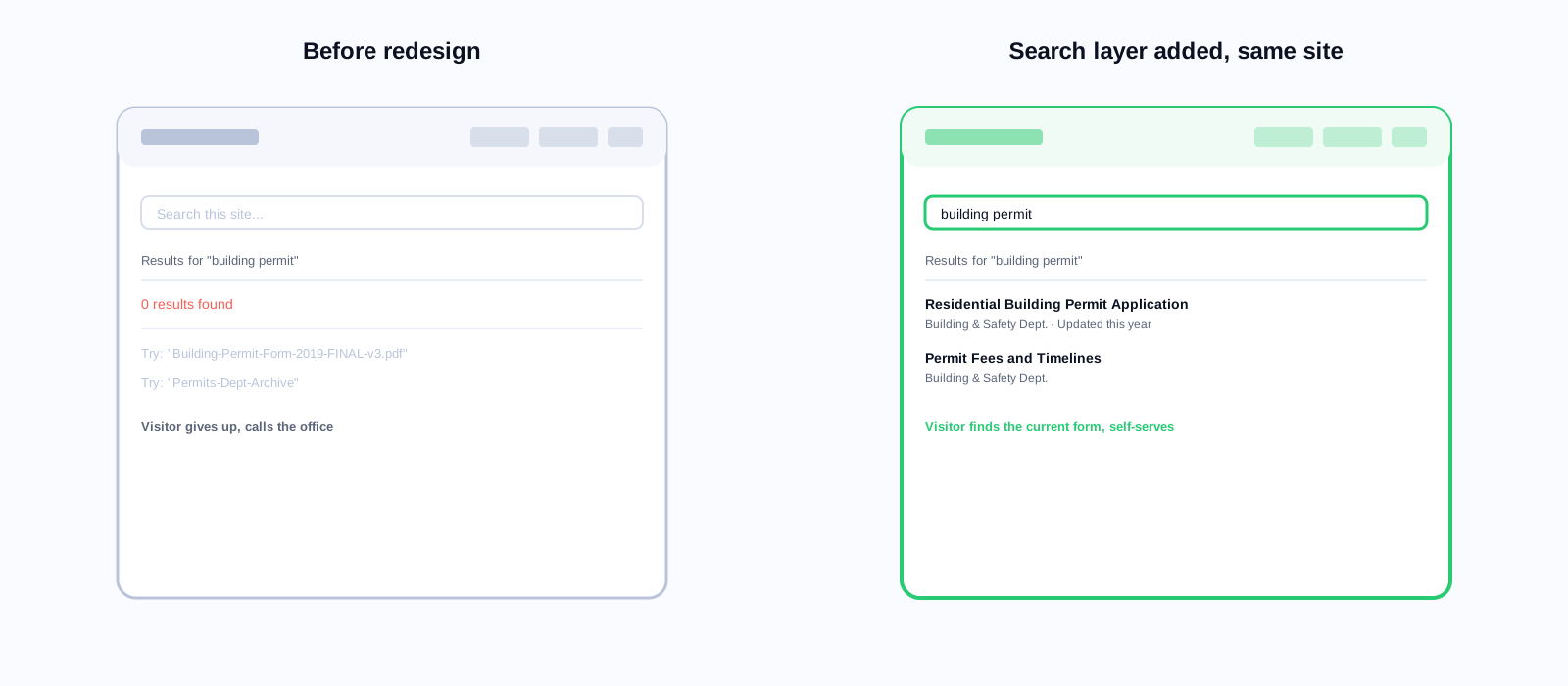
We spent 14 months and $340,000 redesigning our county website. The information architecture is genuinely better. The design is more accessible. Three months later, calls to the planning department about permit applications hadn't moved. The search still returned the 2019 version of the permit guide above the current one.
Web manager, county government serving roughly 210,000 residents
Why Search Ends Up as an Afterthought
There's a structural reason search gets deprioritized. Most government sites run on the CMS's built-in search. Replacing it means a separate procurement, a separate budget line, and a separate integration project, and most redesigns don't have runway for that. So the built-in search gets whatever configuration the CMS allows, and the project calls it done.
Built-in search in Drupal, WordPress, Sitecore, and most other government CMS platforms is keyword-based. It matches the literal words in a query against the literal words on a page. A resident typing "how do I apply for disability benefits" gets pages containing "disability" and "benefits," which may skip the actual application page entirely if it's titled "Benefits Assistance Program Application." AI Search matches intent, not just words, so terminology mismatches like this stop being a dead end. See how AI Search compares to keyword search if your CMS vendor is pitching its native search as good enough.
What Should You Ask Your CMS Vendor Before Trusting Its Search?
Ask for a live demo of five real resident queries in plain language, not product jargon: a benefits question, a permit question, a misspelled query, a query using slang instead of official terminology, and a multi-part question. If the vendor can't run that demo on the spot, their search isn't ready for your residents either.
Most CMS sales teams will show you the admin panel, the indexing settings, and a features list. Very few will let you type a real, messy resident query into a live instance. That's the tell. A platform confident in its search invites the stress test. One that isn't steers you toward the configuration screen instead.
What Does Search Data Show That an IA Audit Cannot?
Search query data shows what residents actually type, in their own words, including terminology that doesn't match your site's official language. An information architecture audit only shows how your content is currently organized, which is a different question entirely.
Even 30 days of real query data surfaces gaps no stakeholder interview would catch. Residents search "garbage pickup" while the site says "solid waste collection." They search "who do I call about a pothole" and there's no page framed that way. They search "school vacation dates" and land on an academic calendar with no holiday list. This is design input a card-sorting exercise will never produce, because residents don't think in your site's taxonomy.
A redesign team with 90 days of search analytics knows more about resident needs than one running on stakeholder interviews alone. Deploy search first. Mine the data. Then design the information architecture around what residents are actually trying to find, not around what the org chart says the site should look like.
The Search-First Redesign Approach
Phase 0: Deploy AI Search on the Existing Site
Before any redesign work starts, deploy AI Search on the current site. A crawl-based implementation takes 3 to 7 business days. Run it for 60 to 90 days and collect the query data. Now you have a real picture of what residents search for, what they can't find, and where the content gaps sit, feeding every later phase of the project.
Phase 1: Information Architecture Grounded in Search Data
Use the top 200 search queries as a direct input to IA decisions. If "renew my dog license" shows up 800 times with no page framed that way, that's a page that needs to exist and be findable. The data doesn't design the IA for you. It tells you exactly where the current one is failing residents.
Phase 2: Build and Migrate With Search in Mind
During migration, flag every page that showed up frequently in search results. These carry the most resident reliance. Preserve their URL structure or set proper redirects, re-index them immediately after migration, and audit them first for content accuracy and accessibility once the new site is live.
Phase 3: Launch With Search Already Working
When the new site launches, AI Search should already be indexed and tested, not switched on the week after. A well-structured site paired with search that actually works is what drives call volume down. Either one without the other is a partial fix.
The procurement timing advantage
AI Search is available through GSA MAS, NASA SEWP V, and NASPO ValuePoint, so it can typically be procured in parallel with a redesign project without a standalone RFP. On an 18-month redesign, that's 17.5 months of search data available to inform the design before launch.
78%
of government site visitors use search as their first action
$200K–$2M
typical cost range for a government website redesign
3–7 days
to deploy AI Search on an existing site via crawl-based indexing
17.5 mo
of search data available before launch on an 18-month redesign timeline
What a Search-First RFP Actually Requires
If search is going into the redesign RFP as its own line item rather than a CMS checkbox, a handful of requirements do most of the work.
- A pilot deployment on the current site before the RFP closes, so evaluators compare real query results, not sales-deck screenshots.
- Semantic matching demonstrated against at least 10 of your agency's own zero-results queries pulled from existing search logs.
- Indexing scope covering PDFs, forms, and any connected knowledge base, not just CMS-managed HTML pages.
- A re-indexing SLA measured in minutes after content changes, not the overnight batch jobs still common on legacy platforms.
- WCAG 2.1 AA conformance for the search interface itself, including keyboard navigation and screen reader announcement of dynamic results.
Score these requirements alongside the navigation and visual design criteria, not as an afterthought line at the bottom of the technical requirements. Vendors respond to what's scored. If search doesn't carry weight in the evaluation, it won't get real investment in the proposal either.
What Should Your Post-Launch Content Strategy Look Like?
After launch, zero-results queries become a direct brief for content the redesign missed. Route them to content owners monthly and treat them as an ongoing backlog, not a one-time report.
A web manager who reviews search analytics every month and assigns zero-results queries to content owners is running a continuous improvement program, not a redesign that ends at launch. Six months into a search-first redesign, query success rates keep climbing because the data keeps driving targeted content fixes. Skip that feedback loop and the site drifts back toward the state it was in before you spent $340,000 fixing it.
None of this requires a bigger team. It requires a standing 30-minute meeting on the calendar and one person with the authority to route a zero-results query to the department that owns the missing content. Agencies that skip the meeting almost always rediscover the same gaps eighteen months later, at the start of the next redesign.
Read next
Planning a CMS migration alongside the redesign? Our government website migration checklist covers the search-specific steps most migration plans skip: re-indexing, redirect mapping, and query continuity.
Related reading
If a redesign is in planning or already underway at your agency, book a 30-day AI Search pilot on your current site before the new IA gets finalized.
Ready to see it in action?
Book a demo and we'll configure Keyspider on a live sample of your content, within 48 hours.
Book a Demo