

Your contract is signed. Now someone on your team, probably you, has to answer the question that actually keeps IT directors up at night: what gets connected first, and who sees what the moment it goes live?
This is a workplace search implementation playbook for the part of the project nobody puts in the sales deck: the staged rollout itself. Not the pitch. Not the ROI math. The week-by-week sequence of connecting SharePoint, Google Drive, and Confluence to a single internal search layer, in an order that respects your existing permissions instead of accidentally exposing a folder that should've stayed locked down three systems ago.
Thirty-five years of watching IT shops deploy enterprise software teaches you one thing fast: the projects that fail aren't the ones with bad technology. They're the ones where nobody staged the rollout, and six weeks in, HR finds out the whole building can search the layoff spreadsheet.
The Short Answer
A staged workplace search rollout connects your lowest-risk, highest-volume content systems first, SharePoint, Drive, and Confluence, typically live within two weeks of a signed contract. Business systems carrying sensitive HR, finance, or case data get connected later, after the permission model has proven itself on content everyone already shares informally. No documents move. No migration project. The connector reads your existing access controls and enforces them at query time, not on a nightly batch.
Why This Isn't a Migration Project, and Why That Distinction Matters
Every IT director who has survived a SharePoint migration, a portal consolidation, or an "enterprise content management initiative" that ran eighteen months over budget has the same reflex: assume the new search tool means moving everything into one place first.
It doesn't. A connector-based rollout indexes content where it already lives. SharePoint stays SharePoint. Drive stays Drive. Confluence stays Confluence. The index is a parallel map of what exists and who can see it, not a new home for the files themselves. Keyspider's own deployment language is blunt about this: "no migration, no consolidation, no IT project required." That's not a slogan, it's the actual architecture decision that makes a two-week go-live possible instead of a six-month one.
Here's the practical difference. A 2000s-era enterprise portal project meant picking a winner system, migrating years of content into it, and asking three departments to change how they file things. A connector rollout means none of that. Employees keep saving files exactly where they already save them. The search layer just gets smarter about finding those files and respecting who's allowed to open them.
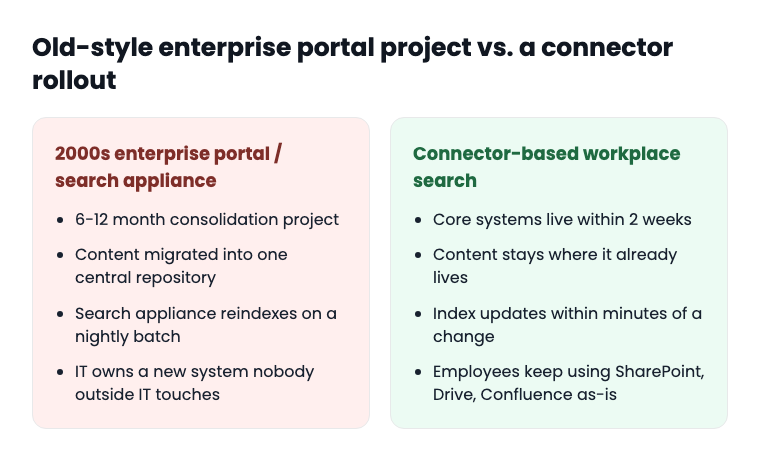
That matters for a second reason, too. Your SharePoint permission structure took years to build, badly in some departments, deliberately in others. A migration project forces you to recreate all of it from scratch in a new system, which is exactly how oversharing incidents happen. A connector rollout inherits what's already there. Get the permission model right on day one and the rest of the rollout is sequencing, not surgery.
Permission-Aware Connectors vs. Federated Connectors: Know Which One You're Buying
This is the question that separates a rollout that holds up under an audit from one that becomes next year's incident report, and it's worth settling before you touch a single connector.
A permission-aware connector reads the source system's access control list directly, SharePoint's site and library permissions, Drive's sharing settings, Confluence's space restrictions, and enforces that same access structure inside the search index. If someone can't open a file in SharePoint, they don't see it in search results either. Not because the search tool checked twice. Because the index itself is built with the permission map attached to every document.
A federated connector does something different, and vendors don't always say so out loud. It only indexes content that's already open to everyone, treating anything with restricted access as invisible rather than solving the problem of showing it to the right people. That sounds safer. It isn't. It just means your internal search tool quietly ignores half your institutional knowledge: the restricted HR policy library, the finance team's budget workspace, the general counsel's Confluence space. Employees searching for a policy that exists but sits behind a permission boundary get a "no results found" instead of an answer, which sends them right back to emailing three people and waiting two days.
Ask your vendor which one they're selling you. The 2026 market consensus has moved: permission-aware retrieval that enforces access controls at query time, with index updates reflected in minutes rather than a nightly rebuild, is now treated as the baseline requirement for enterprise search, not a premium feature. If a vendor's answer is vague on this point, that's your answer. This is also the same access-control logic behind NIST 800-53's access control family (AC-3, AC-6), which most state agencies already reference when they write security requirements into an RFP. A rollout that enforces permissions at the index level is the practical implementation of that control, not a separate compliance exercise.
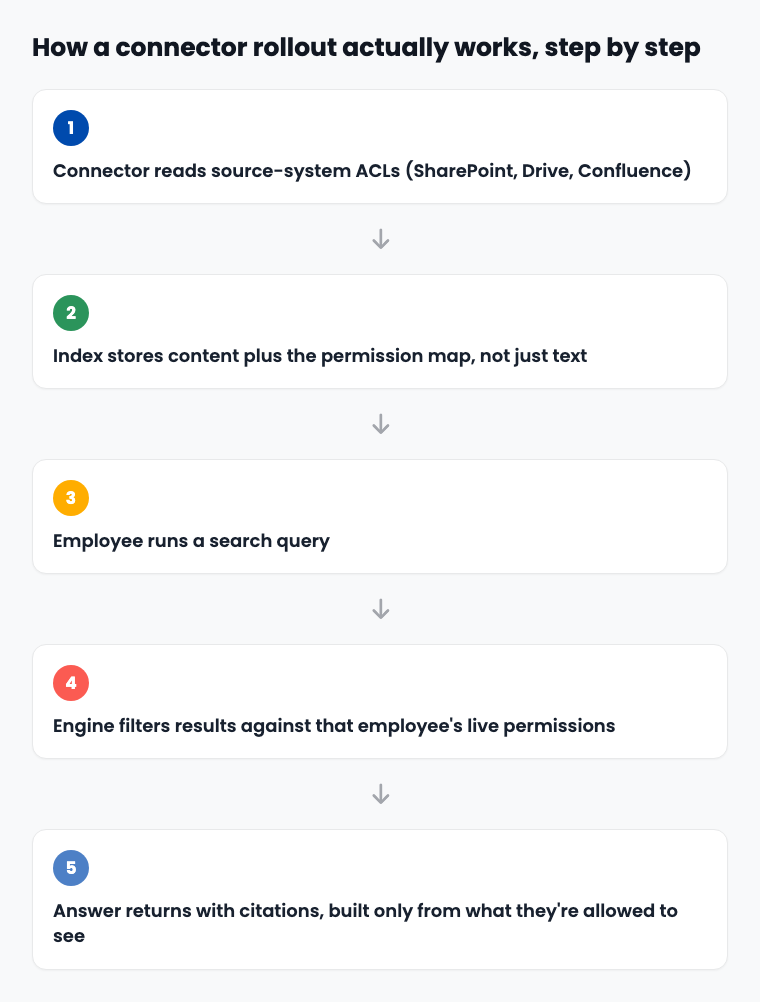
Real-time propagation is the other half of this. If an employee gets removed from a SharePoint group on Tuesday morning, their search results need to reflect that by Tuesday afternoon, not whenever the next nightly sync happens to run. Keyspider indexes changes within minutes of the source-system update. A terminated employee's access doesn't linger in a stale index for a day while IT scrambles to figure out why. This is the single most important technical fact to verify with any vendor before you schedule week one, so put it in writing before you sign off on a go-live date.
The Staged Rollout: Week by Week
Here's the sequence that works, built around risk tolerance, not around which connector happens to be easiest to configure.
Week 1: Kickoff, Permission Audit, Core Connectors Configured
Your dedicated onboarding team maps which systems connect first. This week is mostly audit, not integration. Someone needs to walk through your current SharePoint, Drive, and Confluence permission structure and flag anything that looks like legacy oversharing, an "Everyone except external users" link from 2019 that nobody remembers creating, a shared drive folder that somehow inherited edit access for the entire domain.
Do this before connectors go live, not after. If a search tool exposes a misconfigured permission the week it launches, the story in your building becomes "the new search tool leaked our files." It didn't. The permission was already broken. Search just made it visible, exactly the way Copilot rollouts have made years-old SharePoint oversharing instantly discoverable across hundreds of organizations in 2026. Fix the permission before week one ends, not during week three when someone in HR calls you.
Week 2: SharePoint, Drive, and Confluence Go Live
Core content search goes live across your three highest-volume, lowest-sensitivity systems. This is the "live in two weeks" milestone, and it's realistic specifically because these three systems carry the bulk of day-to-day document traffic without carrying the sensitivity of HR or finance records. Employees start searching across all three from one bar. IT starts watching the search analytics dashboard for the first signal of where the gaps actually are, not where you assumed they'd be.
A county health department and a university library will have different week-two experiences. The health department's biggest Confluence space might be protocol documentation, open to all clinical staff. The university's might be a research group's working notes, scoped to a dozen people. Same rollout stage, different risk profile, same architecture reading each system's own rules instead of applying a blanket policy.
Weeks 3-4: Business System Connectors, Staged
Now the harder systems come online: ServiceNow, Salesforce, Workday, SAP, the systems holding ticket histories, customer records, and HR data. These wait until weeks three and four for a reason that has nothing to do with technical difficulty and everything to do with risk sequencing. By this point, the permission model has run for two weeks against lower-stakes content. You know it works. You've watched it hold the line on a shared drive folder that should've been locked down years ago. Now you extend that proven model to systems where a mistake costs more.
Resist the temptation to front-load HR and finance connectors into week one because "it'll save time later." It won't. It just means your first stress test of the permission architecture happens on your most sensitive data instead of your least sensitive. Sequence risk deliberately.
Weeks 5-6 and Beyond: Custom Connectors, Analytics Tuning, Department Rollout
Custom connectors for systems outside the standard catalog get built here. Keyspider's standard list covers 40-plus systems already, SharePoint, OneDrive, Google Drive and Workspace, Box, Dropbox, ServiceNow, SAP, Salesforce, Workday, Jira, Confluence, Notion, Teams, Slack, Zendesk, and more, so most organizations never need a custom build. If yours does, confirm turnaround with your account team rather than planning around a number from a vendor page. Published timelines don't always agree, and a written estimate for your specific system beats guessing.
This stretch is also where search analytics starts paying for itself. You'll see exactly what employees search for and where they're coming up empty, which tells you which department's content needs attention next. Department-by-department rollout for anything beyond the core systems follows that data, not a guess.
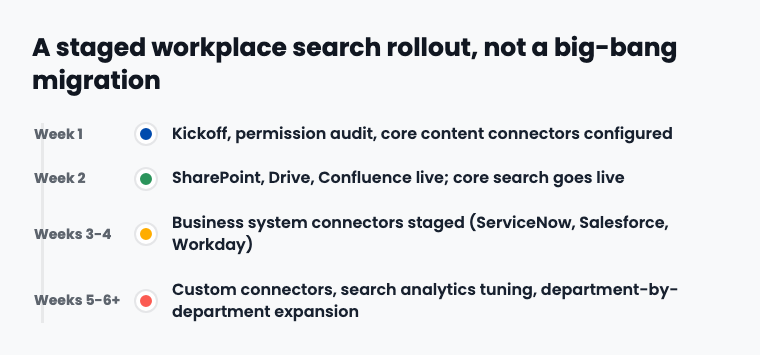
One honest note here: the "live in two weeks" figure describes core content search going live, not every connected system in your environment running at full tilt. An organization with six business systems and three legacy file servers should plan on a longer full rollout, staged deliberately, not compressed to hit a headline number. A procurement officer who hears "two weeks" and expects every connector live by day fourteen is setting the project up to look like it missed a deadline it was never actually promised.
What to Lock Down Before You Connect Anything
A rollout goes sideways when the permission audit gets treated as a formality instead of the actual gating step. Before any connector touches production data, confirm these six things, and get sign-off from IT security, not just IT operations.
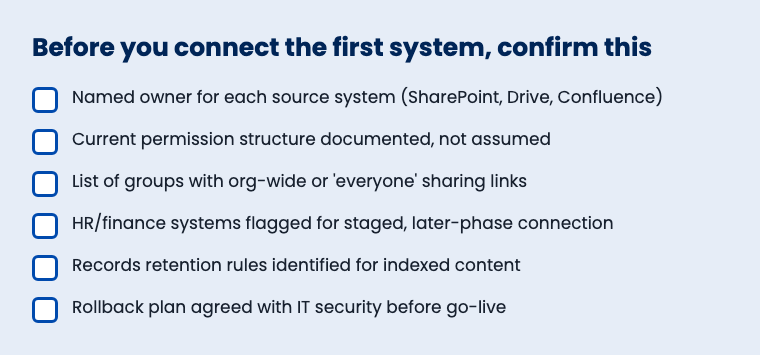
- 1Named owner for each source system. SharePoint, Drive, and Confluence each need one person who can answer permission questions fast during go-live week. Not a committee. A name.
- 2Current permission structure documented, not assumed. If nobody can say with confidence who has access to a given SharePoint site right now, that's the thing to fix in week one, before search makes the gap visible to everyone who uses it.
- 3List of groups with org-wide or "everyone" sharing links. Every organization has at least one of these. Find it before go-live, not after a search query surfaces it to someone who shouldn't have found it.
- 4HR and finance systems flagged for later-phase connection. This is the sequencing decision from weeks 3-4 above, written down and agreed to in advance so nobody tries to rush it.
- 5Records retention rules identified for indexed content. State and local agencies in particular need to know how search indexing interacts with existing records retention schedules before, not after, the audit trail starts generating.
- 6Rollback plan agreed with IT security before go-live. If something looks wrong in week two, everyone needs to already know the procedure for disabling a connector without disabling the whole search layer.
Skip the permission audit and you're not actually running a staged rollout. You're running a big-bang launch with a staggered connector schedule, which carries the same oversharing risk as turning everything on at once. Universities feel this acutely: a history of siloed departmental systems with ten years of inconsistent permission hygiene makes the week-one audit longer, not optional.
What Changes for Your Employees During the Rollout
Your new hire in facilities doesn't care about connector sequencing. She cares whether the onboarding packet she needs is findable. By week two, she's typing a plain-English question into one search bar and getting an answer pulled from whichever core system actually held it, with a citation showing where it came from. She never has to know it was SharePoint. She just gets the answer.
Your facilities director, who's been fielding "where is the HVAC maintenance log" tickets for years, sees those tickets start dropping within the first month, not because anyone trained staff on a new tool, but because the tool answers the question the way a person would. That's the actual measure of a rollout working: not uptime, not connector count, but whether the "ask Dave" emails stop showing up in his inbox.
IT support feels it fastest. A 38% share of help desk tickets asking "where is X" doesn't disappear on day one, but it starts trending down as soon as core content search goes live in week two, and it keeps trending down through weeks three and four as business systems come online. That's the metric worth tracking on your own dashboard starting week one, before you have a baseline you can't recreate later.
Where This Fits With the Rest of Your Rollout Checklist
This playbook covers sequencing and architecture. It isn't a substitute for the security and compliance review that should happen alongside it, or the permission cleanup that needs to happen before SharePoint connects at all. Pair this with a workplace search compliance checklist covering CJIS, FERPA, and state records retention if your organization handles regulated data, and run a SharePoint permission audit before week one starts, not during it. That audit is what actually prevents the oversharing incident that's been showing up across Copilot rollouts all year.
If your rollout is part of a broader Keyspider implementation engagement, your onboarding team should already be walking through this sequence with you. The full connector catalog lives on the integrations page if you need to confirm a specific system is supported before you finalize your week-by-week plan. And if you're still deciding whether Workplace Search is the right fit before committing to a rollout date, that's a conversation worth having before, not after, you lock in week one.
This is different in scope from a public-facing government website migration checklist, which covers moving a citizen-facing website between content management systems. A workplace search rollout touches internal systems your staff use, SharePoint, Drive, Confluence, ServiceNow, not your public web presence. Keep the two off the same project timeline.
Talk to someone before you lock in week one
A rollout plan on paper is not the same thing as a rollout plan that survives contact with your actual SharePoint permission structure. Talk to a Keyspider deployment engineer about your connector sequence and leave with a week-by-week plan built around your systems, not a generic template.
Related reading
Frequently asked questions
How long does a workplace search implementation actually take?
Core content systems, SharePoint, Drive, and Confluence, can go live within two weeks of a signed contract, per Keyspider's stated deployment timeline. Full rollout across all connected business systems typically extends several weeks beyond that, staged deliberately by system sensitivity rather than compressed to hit a single headline number.
Do we need to migrate our documents to roll this out?
No. The connector model indexes content in place. Nothing moves out of SharePoint, Drive, or Confluence, and nobody has to change how they file or save anything.
What's the difference between a permission-aware connector and a federated one?
A permission-aware connector reads and enforces the source system's access controls at query time, down to the individual document. A federated connector only indexes content that's already open to everyone, which avoids the permission question instead of solving it, and quietly hides restricted content from search entirely.
Should we connect HR and finance systems in the first phase?
Generally no. Stage systems like ServiceNow, Salesforce, and Workday after your core content rollout has proven the permission model holds up on lower-stakes content first. Sequencing risk deliberately beats front-loading your most sensitive systems into week one.
What happens if we need a connector for a system that isn't in the standard catalog?
Custom connectors are available beyond the 40-plus systems already supported. Turnaround time varies by system complexity, so confirm a specific timeline with your account team rather than planning around a number from a vendor page.
Does rolling this out require a separate IT project budget and timeline?
No. The architecture is built around no migration, no consolidation, and no separate IT project, with billing running as one contract and one invoice even across multiple departments.