

Any AI tool that reads SharePoint will surface whatever SharePoint already exposes. That's the whole risk in one sentence. A SharePoint permission audit checklist walks your IT team through finding and fixing over-shared sites, stale "Everyone" links, and undocumented access exceptions before an AI assistant turns years of quiet oversharing into something anyone can ask about in plain English.
Key takeaway
Copilot and AI search tools don't grant new access. They just make existing access instantly findable. Run the inventory, re-scope the overshared sites, document the exceptions, then turn on AI search: that order matters more than any vendor's feature list. Fix the permissions first, and the AI layer stops being a liability and starts being what it was sold as.
Why your SharePoint oversharing fix can't wait for the next IT cycle
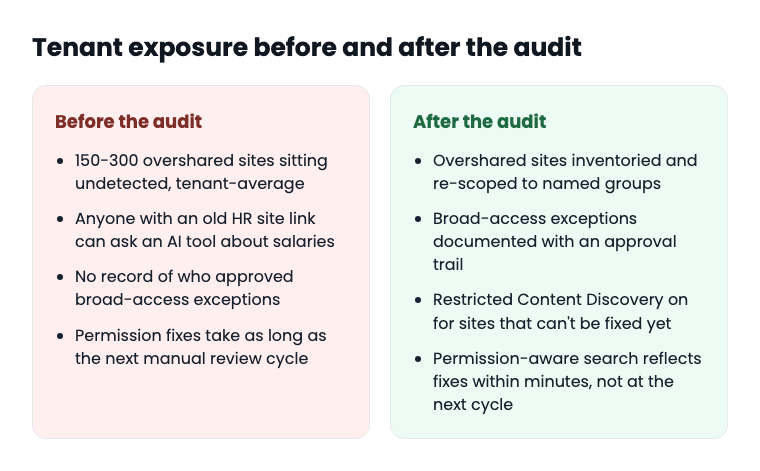
Microsoft 365 Copilot retrieves content through Microsoft Graph, and it honors whatever permissions already exist on a file or site. If a SharePoint site was shared with "Everyone except external users" back in 2021 and nobody ever revisited it, Copilot doesn't care that the sharing was accidental or forgotten. It just answers the question. EPC Group, which runs Copilot-readiness audits for a living, reports finding an average of 150 to 300 overshared SharePoint sites per enterprise tenant. Multiply that by however many fiscal years your agency has been on SharePoint, and the number stops being surprising.
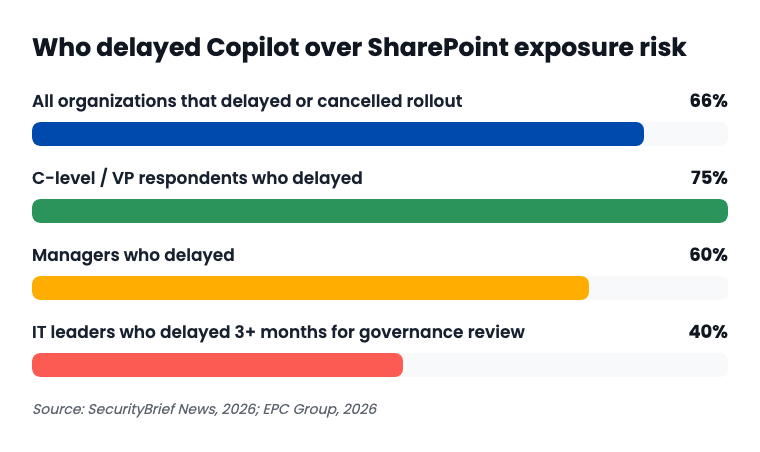
The market noticed. 66% of organizations delayed or canceled a Copilot rollout over SharePoint data-exposure concerns, according to 2026 survey data. What's more interesting than the headline number is who's worried: 75% of C-level and VP respondents delayed, compared to 60% of managers. The people who sign the budget are more nervous than the people who'd actually use the tool. That's not a training problem. That's a trust problem, and it starts upstream of any AI vendor.
This is a different problem than the one covered in why Copilot makes documents easier to draft but not easier to find. That's a findability gap. This is a security gap, and it sits one layer upstream.
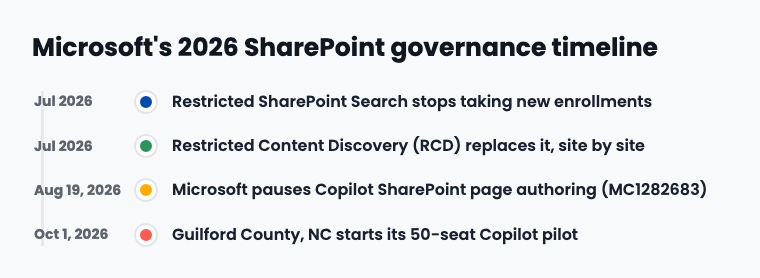
Microsoft itself has been adjusting the dials all year. Restricted SharePoint Search, the original exclusion tool, stopped accepting new enrollments in July 2026, replaced by Restricted Content Discovery (RCD), a site-level toggle in the SharePoint admin center. Then on August 19, 2026, Microsoft paused the rollout of Copilot-powered SharePoint page authoring (tracked internally as MC1282683) without publishing a detailed reason. Read between the lines: even the vendor is still finding sharp edges.
"Picture a county IT department with four people supporting 1,800 employees across 14 departments. SharePoint has been live since 2016. Nobody has run a sharing-link audit since the migration. That's not a hypothetical edge case. It's the median SLED tenant, and it's exactly the tenant where an AI rollout turns an old filing mistake into a live incident."
What "permission-aware" actually means, and what it doesn't fix
Here's the part vendors tend to skip: a permission-aware search layer, Keyspider's or anyone else's, inherits whatever access control already exists on the source system. If SharePoint says a folder is open to "Everyone except external users," a permission-aware tool sitting on top of SharePoint will respect that setting faithfully. It will not second-guess it, and it will not know it was a mistake.
Honest gap
No search layer fixes bad SharePoint ACLs. The fix is the audit itself. This checklist is the thing that actually closes the gap, not a sales pitch standing in for it.
What a permission-aware index can do, once the underlying permissions are sound: narrow the window between a permission change and that change reflecting in search results. Keyspider's documented real-time indexing reflects source-system changes within minutes rather than waiting for a nightly or weekly reindex. If your team fixes an overshared site at 2 p.m., search results should stop surfacing it by 2:05, not at next Tuesday's batch job. That's a meaningfully different risk profile than a search tool that only reindexes overnight.
Red flag
If a vendor can't tell you how fast a permission change propagates to search results, ask directly. "Eventually" is not an answer your security committee should accept.
The 8-point SharePoint permission audit
Run this before you flip on any AI connector, whether it's Copilot, an internal search tool, or anything else that reads SharePoint directly.
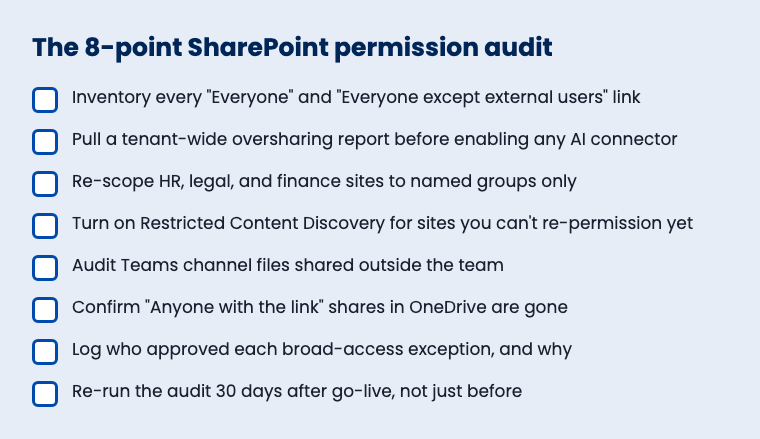
Inventory every "Everyone" and "Everyone except external users" link.
Use SharePoint admin center reporting or a third-party scan. Don't trust memory. Nobody remembers a link from 2019.
Pull a tenant-wide oversharing report before enabling any AI connector.
This is the single step that matters most. Do it first, not in parallel with rollout.
Re-scope HR, legal, and finance sites to named security groups.
These are the sites where a stray "Everyone" link causes the worst headline. Fix them before anything else.
Turn on Restricted Content Discovery for sites you can't re-permission in time.
RCD excludes a site from AI-surfaced answers without requiring a full access-control rebuild first. It's a stopgap, not a fix, but it buys time honestly.
Audit Teams channel files shared outside the team.
Teams quietly creates a SharePoint site behind every channel, and file-sharing inside Teams inherits the same oversharing risk as SharePoint proper.
Confirm "Anyone with the link" shares in OneDrive are gone.
Personal OneDrive sharing is where individual employees create their own oversharing problem, one forwarded link at a time.
Log who approved each broad-access exception, and why.
If a site legitimately needs wide access, document the business reason and the approver. This is the record your records-retention policy and your records-request process will both eventually need.
Re-run the audit 30 days after go-live, not just before.
Permissions drift. New sites get created, new shares get set, and the tenant you audited in March isn't the tenant you have in June.
Before and after: what the audit actually changes
The governance questions this audit answers before someone else asks them
State and local agencies aren't dealing with a hypothetical risk. A few live examples from 2026:
- San Francisco deployed Microsoft 365 Copilot Chat for city employees starting July 14, 2025. By April 2026, journalists and researchers had filed a California Public Records Act request for records of that deployment and how it's used. Whatever your agency rolls out, assume someone will eventually ask how it's governed.
- Morrow County, Oregon commissioners publicly pressed staff on whether AI interaction logs are retained indefinitely, and who decides if those logs get released under subpoena or a public-records request. That's not a hypothetical governance question. It's a live one, unresolved, on the record.
- Guilford County, North Carolina piloted 50 Microsoft 365 Copilot licenses starting October 1, 2026, at roughly $18,450 a year, about $30.75 per seat per month. A useful real number if your board is asking what this actually costs before they ask what it actually does.
- Arcata, California adopted a draft AI policy on July 15, 2026, spelling out privacy, review, and disclosure rules for Copilot use. No off-the-shelf governance template exists yet, so agencies are writing their own, often ahead of the 2026 wave of state AI executive orders that will eventually require one.
Keyspider's documented audit trail logs every search and every result click across all 40-plus connected systems, not just SharePoint. That's a direct answer to the Morrow County-style question: who looked at what, and can you produce that record under a subpoena or a records request. It's worth being precise here: that's an audit trail of search activity, not a transcript of AI chat conversations, and it's not a substitute for your agency's own records-retention policy. It's documentation that makes answering the question possible instead of guesswork.
AI search security readiness: questions to ask any vendor, including Keyspider
Procurement tip
Put these in the RFP, not in a follow-up call after the contract's signed.
- How fast does a permission change on the source system propagate to your search results: minutes, hours, or the next scheduled reindex?
- Do you maintain an audit log of searches and result clicks across every connected system, or only some of them?
- If a site is misconfigured on our end, does your platform inherit that misconfiguration, or does it add an independent access check?
- What happens to search results for a document the moment we revoke access to it upstream?
- Can you produce a report, on demand, of who could see a specific document and when that access last changed?
For the fuller procurement list, see Keyspider's workplace search RFP question bank, built around exactly this kind of permission and audit-trail language. And if you're still comparing vendors, Gartner's new Magic Quadrant for enterprise AI search is worth a read before you finalize the shortlist.
Related reading
Workplace Search RFP Question Bank
The permission and compliance questions to put in writing before you sign anything.
Copilot Didn't Leak Your Data. Your SharePoint Permissions From 2019 Did.
The narrative version of the incident data in this checklist.
Connector Rollout Playbook
What to do after the audit, when it's time to actually connect systems.
Ready to see what permission-aware workplace search looks like once your tenant is clean?
Book a demo and bring your audit findings. We'll walk through how the index handles them.
Book a DemoFrequently asked questions
Does fixing SharePoint permissions mean we don't need a permission-aware search tool?
No. The audit closes the gap created by bad access control. A permission-aware layer on top, like Keyspider Workplace Search, keeps search results current as permissions keep changing after the audit, since no tenant stays perfectly clean forever.
How long does a SharePoint permission audit like this usually take?
For a mid-size tenant, expect one to three weeks for the inventory and re-scoping steps, depending on how many sites need manual review. EPC Group's 150-300-overshared-sites-per-tenant average is a reasonable planning baseline.
Does Restricted Content Discovery replace the need for this audit?
No. RCD excludes a site from AI-surfaced results, but it doesn't fix the underlying permission. Treat it as a stopgap for sites you can't re-permission before go-live, not a final answer.
Our agency doesn't use Copilot. Does this checklist still apply?
Yes. Any tool that reads SharePoint directly, including Keyspider's connector, inherits the same source-system permissions. The audit isn't Copilot-specific; it's SharePoint-specific.
What's the difference between an audit trail of searches and a log of AI chat conversations?
A search audit trail, like the one documented in Keyspider's product, records what was searched and what was clicked. An AI chat transcript records a conversation. They answer different governance questions, and a records request may ask for either one specifically, so know which your systems actually keep.
Who should own this audit, IT or records management?
Both, working together. IT has the access to run the technical inventory. Records management knows the retention and disclosure rules that determine how long the audit log itself needs to be kept.