

Higher Education Data Silos Aren't a Culture Problem Anymore. They're an Operational One.
Higher education data silos used to be a culture complaint. Deans sighed about it at retreats. Not anymore. Between FERPA access rules, accreditation reviews, and students bouncing across six portals for one answer, decentralized college search has become an operational risk your own staff can't work around.
For twenty years, the fix for this was supposed to be cultural: get the colleges to cooperate, get the deans to share, host a retreat. It never worked, because the problem was never really about attitude. It was architecture. Every college bought its own system, on its own timeline, with its own budget line. The result isn't a communication gap. It's forty systems that were never designed to talk to each other, and a staff that's figured out how to live with it the hard way.
Why Decentralized College IT Search Became Everyone's Problem
2026 higher-ed commentary has started saying the quiet part out loud: breaking down departmental silos isn't a soft culture initiative anymore, it's an operational requirement. Inside Higher Ed's own marketing and communications blog ran a piece this year flatly titled "the death of silos," arguing that inconsistent student-facing information and duplicated systems across colleges have moved from annoyance to liability. Element451 has made the same point from the enrollment side: prospective students get different answers depending on which office picks up the phone, and that inconsistency now shows up in yield numbers, not just satisfaction surveys.
Here's what that looks like on the ground. A registrar in the College of Engineering can't see a financial aid note that Enrollment Services logged last week. A provost's office drafting an accreditation self-study spends three weeks tracking down policy versions scattered across a dozen SharePoint sites, some of which predate the current CIO's tenure. Nobody planned this. It's just what happens when nine colleges, twelve shared-governance committees, and four generations of IT leadership each solved their own small problem without anyone solving the big one.
Keyspider's higher education research backs this up from the student-facing side too. The Higher Education Digital Experience Report 2026 found prospective students and families hitting the same inconsistency internally that staff hit behind the scenes: different offices, different answers, same question. The report was built on prospective-student experience. The silo it describes is the same one your staff deal with every day, just facing the other direction.
What University Knowledge Management Actually Looks Like Today
Picture a mid-size state university: fourteen colleges, nine shared-governance committees, and a knowledge base spread across Confluence, three generations of SharePoint, and at least one shared Drive folder named "FINAL_v3_USE_THIS_ONE." This is a hypothetical, not a named institution, but if it sounds specific, that's because it's the same shape at nearly every decentralized campus.
University knowledge management isn't one system at a place like this. It's dozens of micro-systems, each correct within its own college and useless outside it. A new advisor in the business school can't find the university-wide withdrawal policy because the version they land on through a Google search is three years old and was superseded by a policy the registrar's office never migrated off an old intranet. That's not a training problem. It's a findability problem, and it compounds every semester new staff turn over.
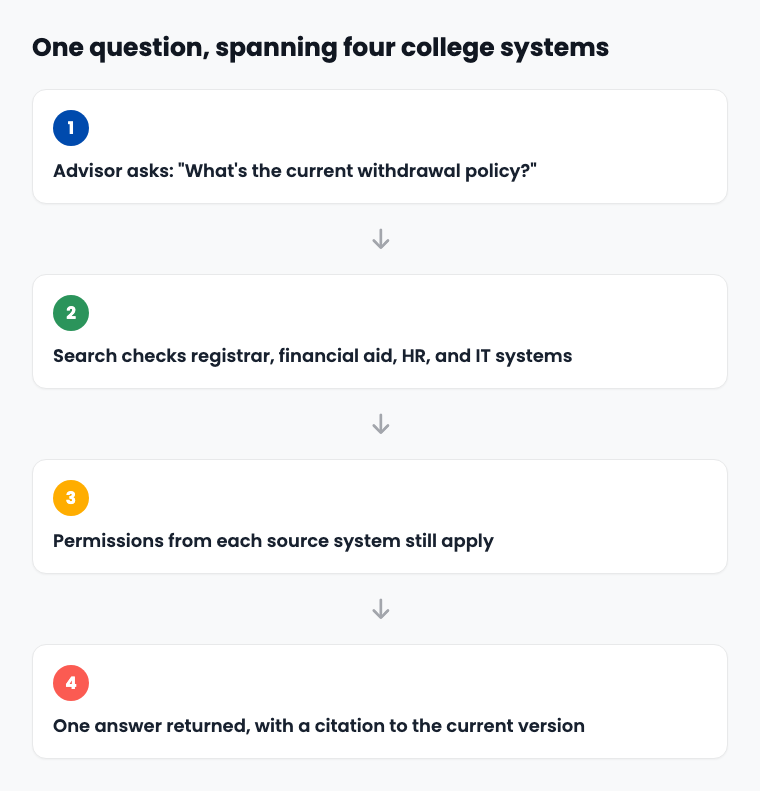
The fix isn't asking fourteen colleges to standardize their SharePoint taxonomy, that project has already failed once at most universities that tried it. It's connecting what already exists. Keyspider's Workplace Search indexes across the systems a university already runs: SharePoint, Google Drive, Confluence, Workday, ServiceNow, without a migration project or a mandate that every college adopt the same tool. One university staff deployment already on record cut HR and IT help desk tickets by 47% (see the case study), which is the kind of number a provost's office can actually bring to a budget meeting.
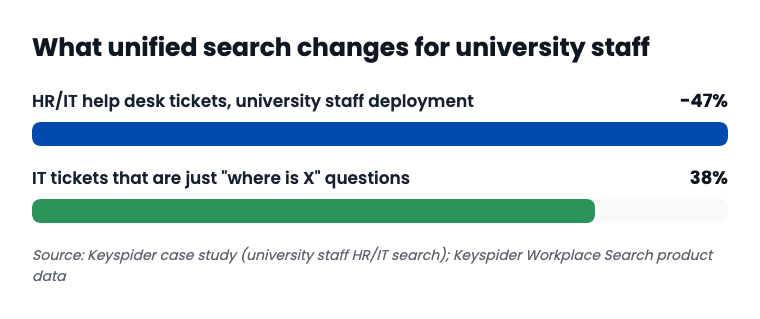
That second bar matters as much as the first. A chunk of what lands in a university help desk queue isn't broken software. It's a staff member who can't find a document that already exists somewhere on campus. New hires feel this hardest, since they haven't yet built the informal map of who-to-ask that veteran staff rely on instead of search.
FERPA and Internal Search: Where Compliance Meets Convenience
Here's the part that makes this more than an efficiency story. FERPA doesn't care that your university is decentralized. It cares whether a financial aid record gets surfaced to someone without a legitimate educational interest in seeing it, and "the search tool returned it" is not a defense that holds up in an audit.
Compliance note
A search tool that returns every student record to every staff member who types "financial aid" isn't saving anyone time. It's creating a FERPA exposure with a search bar attached.
Any internal search layered across a university's systems has to inherit permissions from the source system, not invent its own. If a student worker in the registrar's office can't open a disciplinary file in the native system, a unified search bar built correctly won't surface it either, no matter how relevant the query looks. That's the difference between a convenience tool and a liability, and it's exactly the kind of question a compliance office should be asking before any vendor demo, which is what the internal search compliance checklist is built to walk through.
From Twelve Logins to One Search Bar
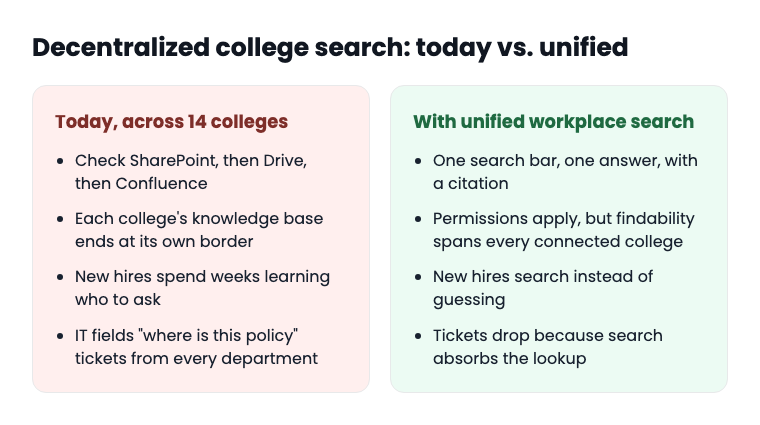
| Today, across a decentralized campus | With unified workplace search |
|---|---|
| Staff check SharePoint, then Drive, then Confluence, then ask a colleague | One search bar, one answer, with a citation to where it came from |
| Each college's knowledge base is correct only within that college | Permissions still apply, but findability spans every connected college |
| New hires take weeks to learn "who to ask" | New hires search instead of guessing who still remembers |
| IT fields "where is this policy" tickets from every department | Search absorbs the lookup; tickets drop |
Rolling this out across a university isn't a single IT project, it's a staged one, because no provost is going to mandate that all fourteen colleges migrate systems on the same day. That staging is exactly what a connector rollout plan built for decentralized institutions is for: connect the systems that are ready first, bring the rest on in waves, and never ask a single college to rip out what's already working.
This is where the "it's just culture" framing finally breaks down completely. You cannot culture-initiative your way out of fourteen different file structures. You can connect them. For a university sizing up what that actually takes, a workplace search platform that plugs into what's already running, rather than demanding a replacement, is the difference between a project that finishes and one that joins the pile of abandoned knowledge-management efforts from the last two decades.
Frequently asked questions
What is a data silo in higher education?
A data silo is any system, SharePoint site, shared drive, or department database, that holds information useful to people outside the department that created it, but isn't connected to anything else. At a university, that usually means every college, and often every department within a college, has its own version.
How does FERPA affect internal search tools at universities?
FERPA requires that student education records only be accessible to staff with a legitimate educational interest. Any search tool indexing across systems has to inherit the same permission rules the source systems already enforce, not create a new, broader layer of access.
Why do university IT departments struggle with search across departments?
Most university IT departments didn't choose every system in use. Colleges and departments often buy their own tools independently, on their own budget cycles, which means IT inherits a patchwork it didn't design and can't easily standardize after the fact.
What's the difference between knowledge management and workplace search?
Knowledge management usually means building and maintaining a single, organized repository, a project that requires everyone to migrate and keep contributing. Workplace search connects to the systems that already exist and makes them findable together, without requiring migration.
How long does it take to roll out search across a decentralized university?
It depends on how many systems are connected and in what order, but a staged rollout, connecting the most-used systems first, can have a usable search live for a pilot group in weeks rather than the multi-year timeline a full knowledge-management migration would require.
Can a unified search tool work if every college uses different systems?
Yes. The systems don't need to match. A search layer that connects to each one independently, SharePoint here, Confluence there, a shared drive somewhere else, doesn't require the colleges to agree on a single platform first.
Ready to see it in action?
Book a demo and we'll configure Keyspider on a live sample of your content, within 48 hours.
Book a Demo