

Stop Remediating the Same PDF: Build a Publishing System
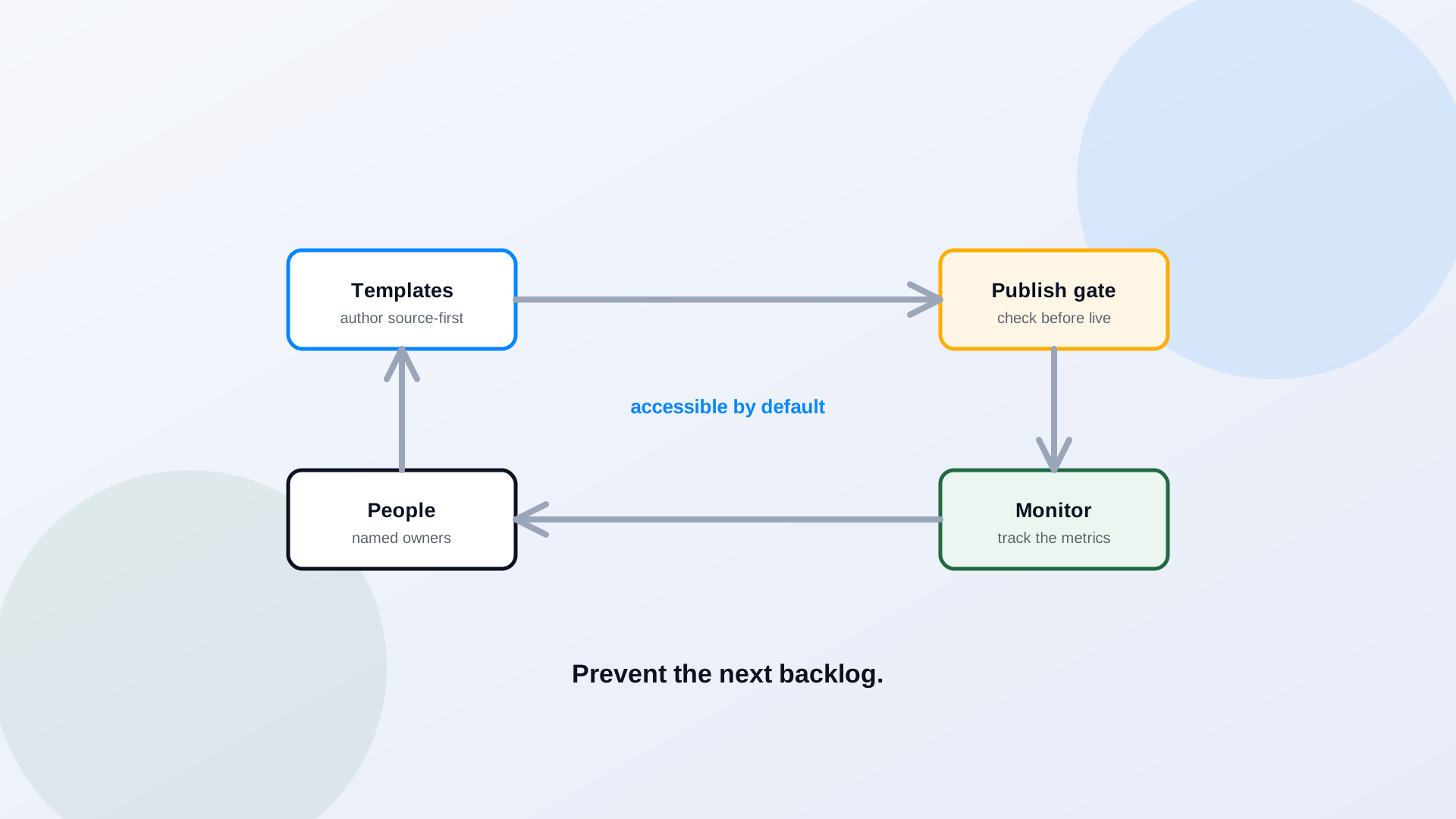
Every agency that finishes a big PDF remediation project discovers the same thing a year later: the backlog is back. New inaccessible documents piled up the entire time the team was fixing the old ones, because remediation cleaned the output without changing the machine that produces it. The durable answer is not a bigger cleanup. It is a publishing system that makes new documents accessible before they ever go live, so the backlog stops regenerating and the one-time project stays one-time.
Why Backlog Projects Fail When Publishing Does Not Change
A remediation backlog is a symptom, not the disease. The disease is a publishing process that lets inaccessible files out the door, and remediation treats the symptom while the cause keeps producing. An agency can spend a year and a real budget clearing ten thousand documents and still be non-compliant the following quarter, because the authoring habits, the export settings, the lack of a review step, none of it changed. Keeping the backlog cleared, which is its own discipline covered in keeping new PDFs in compliance, requires fixing the process, not just the files.
The "Source-First" Principle
Almost every accessibility problem in a PDF is cheaper to prevent in the source than to fix in the export. A heading styled correctly in Word becomes a tagged heading in the PDF automatically. A table built with real header rows carries its structure through. Alt text written on an image in the source travels with it. Fix accessibility once, in the document people actually author, and the accessible PDF falls out of a correct export. Remediate after the fact and you are reconstructing, by hand, structure the source could have carried for free. Source-first is the single highest-leverage change most agencies can make.
Accessible Templates for Word, PowerPoint, Spreadsheets, and Forms
Source-first only works if the sources start right, which means templates. Give every author a set of accessible templates: Word documents with real heading styles, presentation layouts with defined reading order, spreadsheets with header rows, forms with labeled fields. Most staff are not going to learn accessibility theory, and they should not have to. They should open a template where the correct structure is the default and the wrong thing is harder to do than the right thing. Templates turn accessibility from a skill every author must master into a property of the tools they already use.
A Publishing Gate Before Files Go Live
Between "a document is ready" and "a document is live" there should be a gate. Nothing publishes without passing an accessibility check, the same way nothing deploys without passing a test. The gate can be light, an automated check plus a quick structural review for routine documents, and heavier for high-impact ones, but it has to be a real stop, not a suggestion. A gate changes the default. Today, inaccessible is the easy path and accessible is the exception. A publishing gate flips that, so accessible is the only way out the door.
Ownership: Who Does What
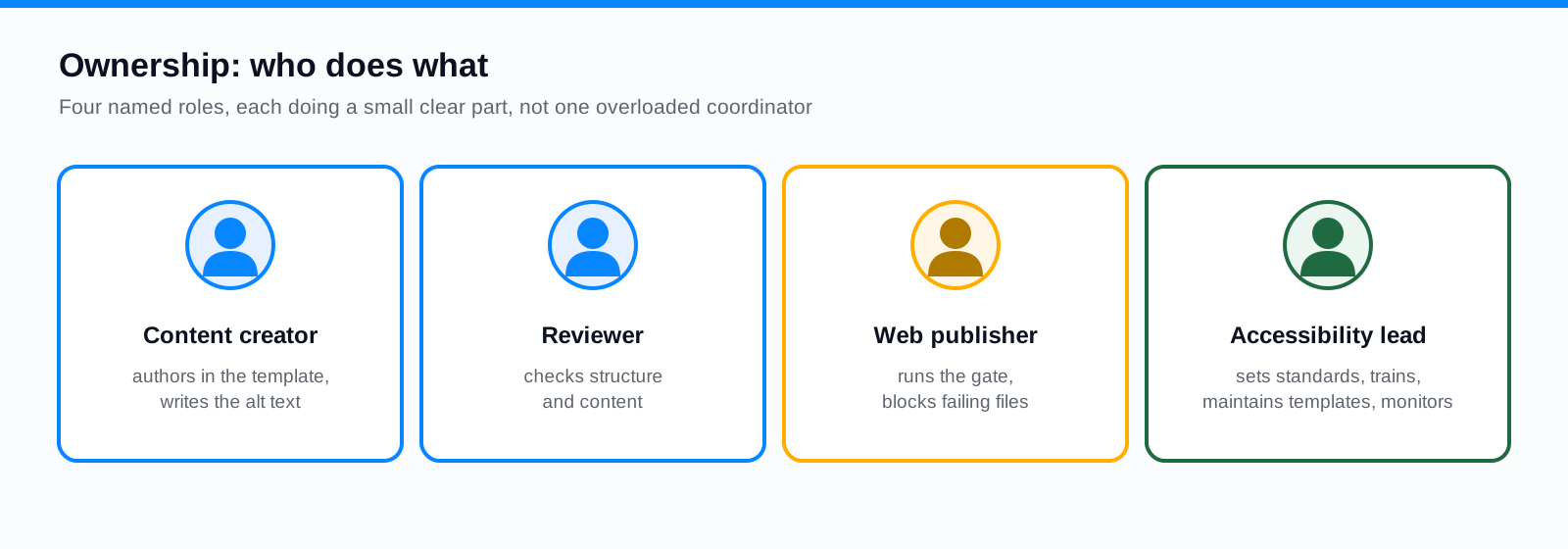
A system needs owners. The content creator authors in the accessible template and writes the alt text, because they know what the image means. The reviewer checks structure and content before it moves on. The web publisher runs the gate and will not post a file that fails. The accessibility lead sets the standards, trains staff, maintains the templates, and watches the metrics. When accessibility is one coordinator's impossible job, it fails; when it is four named roles each doing a small, clear part, it holds.
Vendor and Procurement Language
A lot of your documents are not written by your staff at all. Consultants, software vendors, and contractors produce reports, portals, and forms on your behalf, and under the rule their output is your responsibility. The fix is contractual: require accessible deliverables in the statement of work, specify WCAG 2.1 AA as the standard, and make acceptance contingent on meeting it. Procurement is one of the cheapest places to prevent a future backlog, because a single clause moves the cost of accessibility to the party creating the document. The SLED procurement checklist is a useful starting point for that language.
Dashboard Metrics That Show the System Working
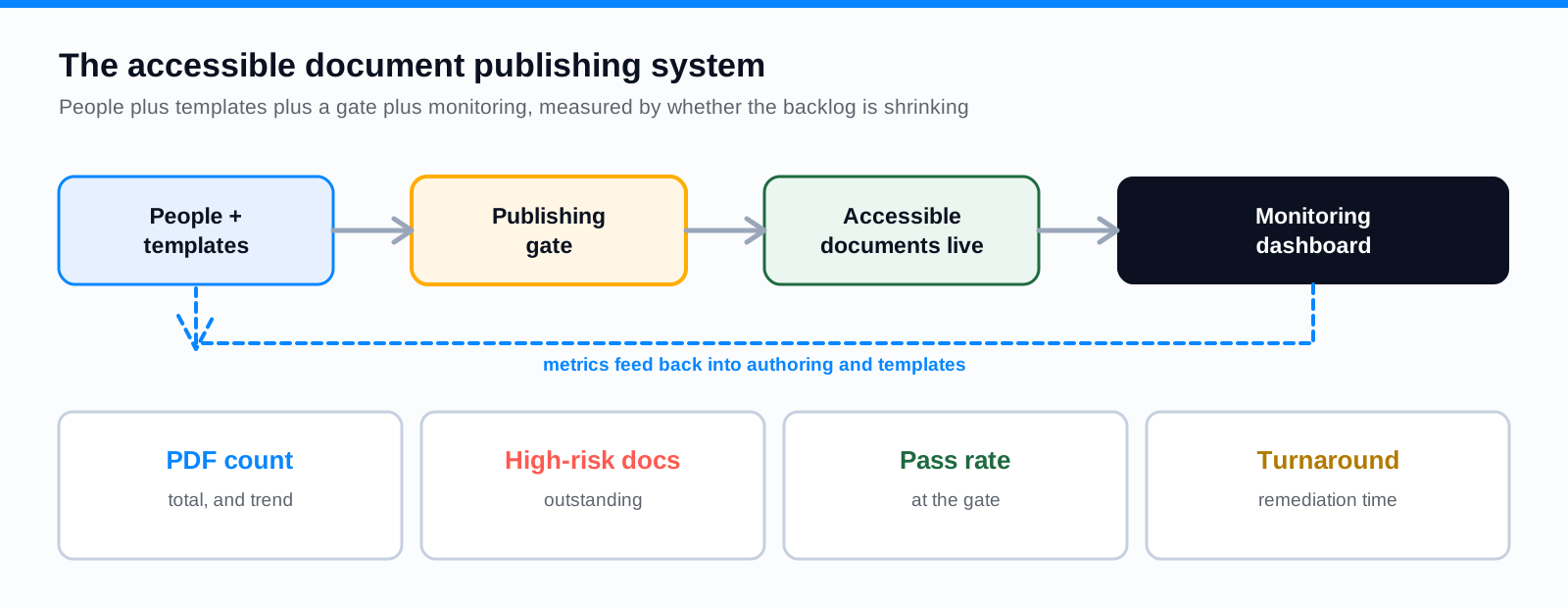
- Total PDF count across all sites, so you know the size of the problem and whether it is growing.
- High-risk documents outstanding, the service forms and active files not yet accessible.
- Pass rate at the publishing gate, which shows whether upstream authoring is improving.
- Remediation turnaround time, how long a flagged document takes to fix.
- New documents published accessible on the first try, the number that proves the system is working.
A 90-Day Implementation Checklist
- 1Days 1 to 30: inventory the archive, pick the accessible templates, and name the four owners.
- 2Days 31 to 60: pilot the publishing gate on one high-volume document type, and add accessibility language to your next procurement.
- 3Days 61 to 90: roll the gate out department by department, stand up the metrics dashboard, and start reporting the pass rate to leadership.
Measure the faucet, not just the bucket
The number that matters most is not how many old documents you remediated. It is what share of new documents publish accessible on the first try. When that number climbs toward 100%, the backlog stops refilling and your remediation project can actually end. Track it, and you will know whether you built a system or just emptied a bucket.
Frequently Asked Questions
Why does our PDF backlog keep coming back?
Because remediation fixes existing files without changing how new ones are produced. If authoring, templates, and publishing practices stay the same, inaccessible documents keep going live and the backlog refills. A publishing system changes the inputs, not just the outputs.
What is the single most effective change we can make?
Source-first authoring with accessible templates, backed by a publishing gate. Fixing accessibility in the source document is far cheaper than remediating the exported PDF, and a gate ensures nothing inaccessible gets out the door.
How do we handle documents from vendors and consultants?
Make accessibility a contractual requirement. Specify WCAG 2.1 AA in the statement of work and condition acceptance on meeting it. Content produced on your behalf is your responsibility, so moving that obligation into procurement prevents future backlog at the source.
How do we know the system is working?
Track the share of new documents that publish accessible on the first try, along with pass rate at the gate and high-risk documents outstanding. If new documents are increasingly accessible by default and the backlog is shrinking rather than refilling, the system is working.
Related reading
Ready to stop fixing the same documents twice? ADA Audit sizes the backlog, remediates the existing files, and monitors for new ones, and PDF to Page turns documents that belong on the web into accessible pages so they never enter the queue. Book a demo and we will help you stand up the publishing gate and the monitoring behind it.
Ready to see it in action?
Book a demo and we'll configure Keyspider on a live sample of your content, within 48 hours.
Book a Demo