

PDF Accessibility at Scale: Manual vs. AI-Assisted Workflows
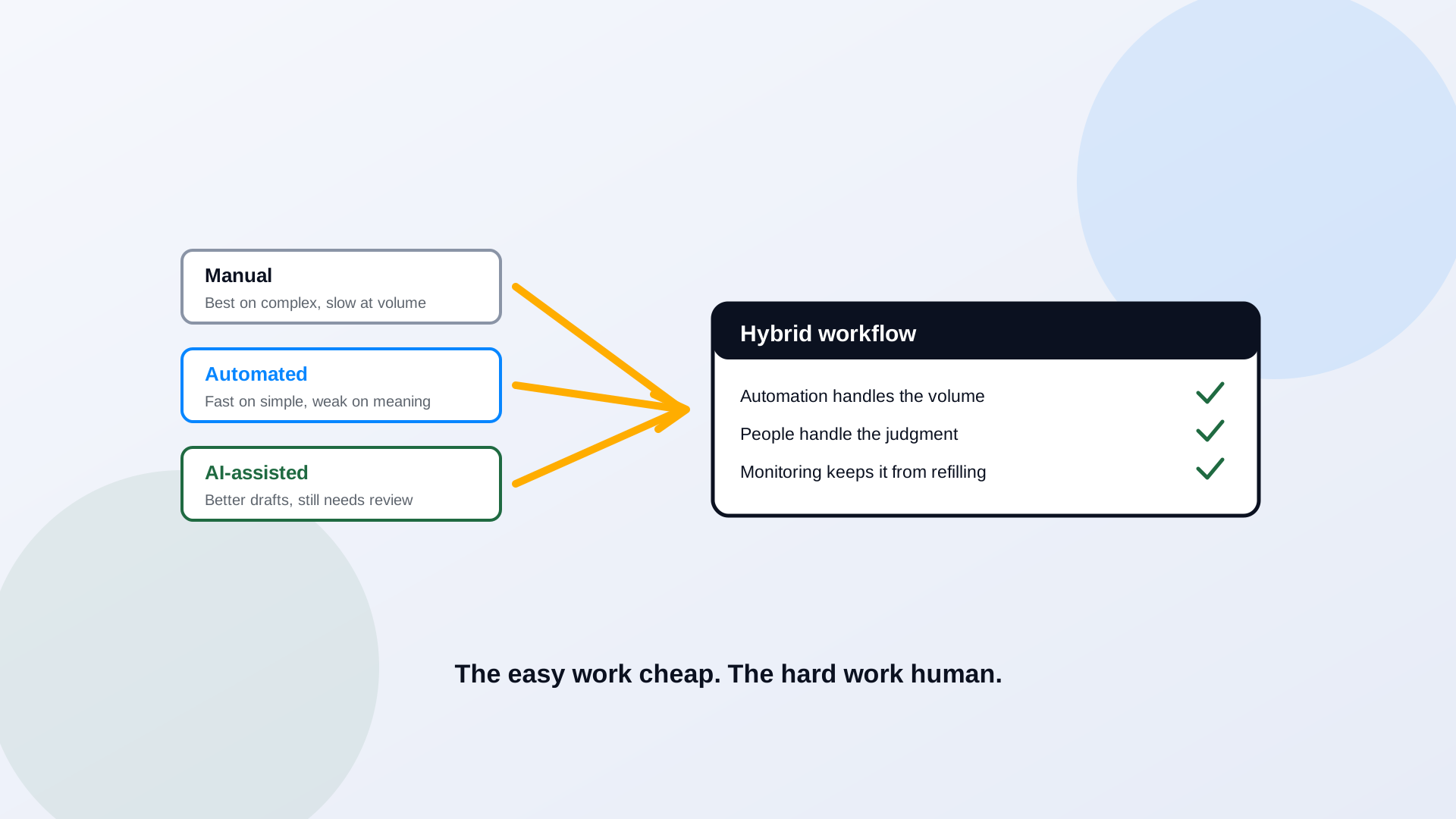
There is no single right way to remediate a PDF. There is a right way to remediate one document and a different right way to remediate ten thousand. A specialist hand-tagging a complex legal filing is doing careful, correct work that does not scale. A pipeline that rips through an archive automatically scales beautifully and gets the hard documents wrong. The question for a government team facing a deadline is not manual versus automated versus AI. It is how to combine all three so the easy work is cheap and the judgment work still gets a human.
Why PDF Accessibility Workflows Need to Scale
The volume is the whole challenge. A government publishes documents constantly, in every format, at every level of complexity, and keeps publishing while the backlog waits. A method that works for a careful one-off falls apart at ten thousand files on a deadline, and a method that works at volume falls apart on the one scanned form that actually matters. Any approach has to handle both the long tail of simple exports and the short list of genuinely hard documents, which is why sequencing the work matters as much as the method, covered in how to prioritize remediation at scale.
Manual PDF Remediation
Manual remediation is a trained specialist working file by file in a PDF editor, adding and correcting tags, setting reading order, writing alt text, and fixing tables and forms. Its strength is quality: on a complex document, a skilled human gets results no automated process matches. Its limitation is arithmetic. At twenty to thirty minutes for a simple file and hours for a hard one, manual-only work cannot clear a large backlog or keep up with weekly publishing. The right use case is the complex, high-stakes document, and the final human sign-off on everything else. The step-by-step method is in how to remediate a PDF for WCAG 2.1 AA.
Automated PDF Remediation
Automated tools apply structural fixes by rule: auto-tagging, reading-order heuristics, OCR on scans, batch metadata. The benefit is speed and consistency across large volumes of suitable documents, the clean exports and simple layouts that make up most of a typical archive. The limitation is that rules do not understand meaning. An automated pass will confidently tag a two-column layout in the wrong order or mark a decorative image as content. Automated output is a strong draft, not a finished document, which is exactly why the results have to be validated, the subject of can a screen reader user actually use it.
AI-Assisted Remediation
AI-assisted remediation sits between the two. It uses models to do more than rule-based automation can: extract content from messy scans, propose tag structure and reading order on layouts that defeat simple heuristics, classify documents by type, draft alt text, and route each file to the right next step. Handled well, it takes a bigger bite out of the backlog before a human ever touches it. The risk is the same one every AI system carries: a confident wrong answer. A model can misread a table's logic or write plausible alt text that describes the wrong thing. AI assistance raises the quality of the draft; it does not remove the need for a person to confirm the result.
Comparison: Manual, Automated, and AI-Assisted
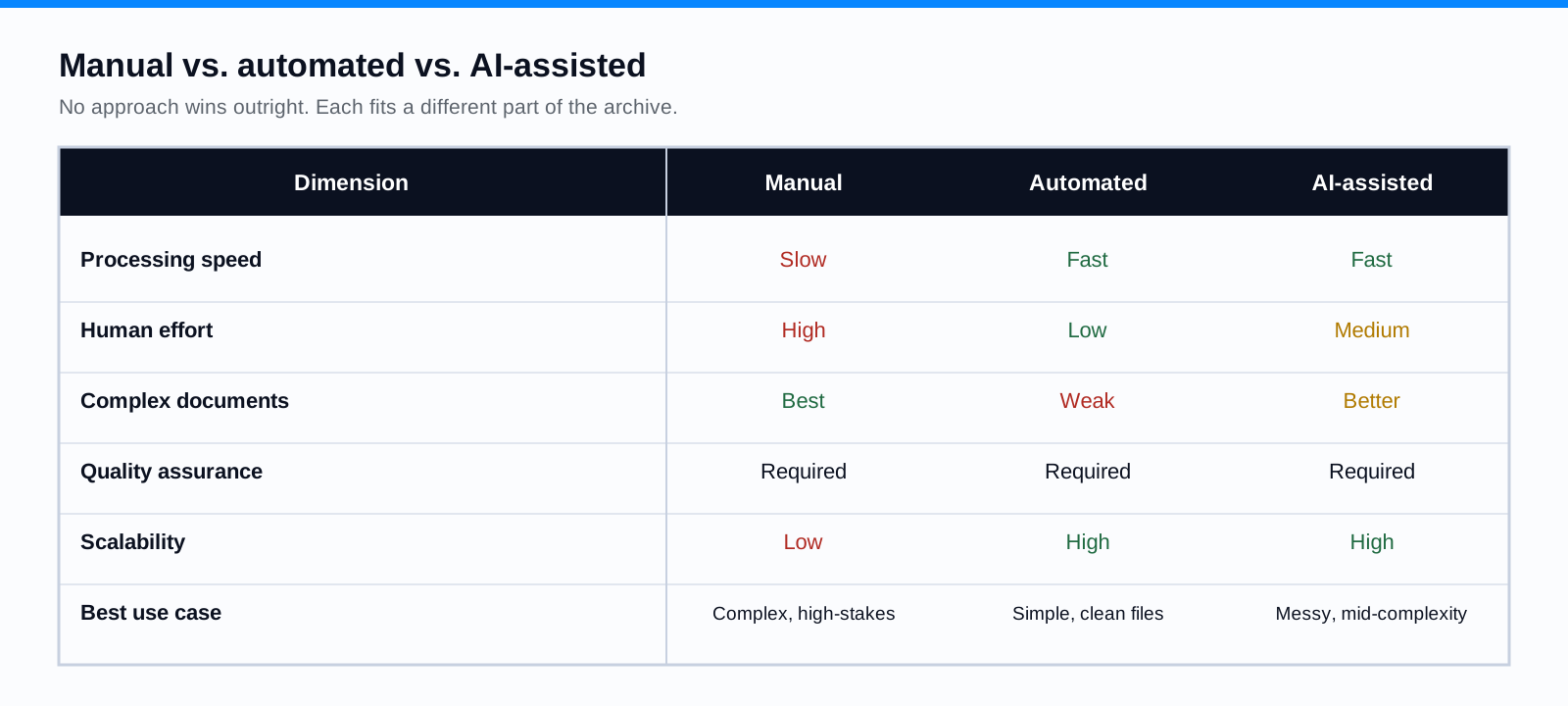
Notice what the table does not say: there is no universal winner and no magic multiplier. Anyone quoting a single percentage that AI will remediate your archive is selling, not measuring. The honest read is that each approach fits a different slice of the work, and the program that scales uses all three.
A Hybrid Workflow for Better Results
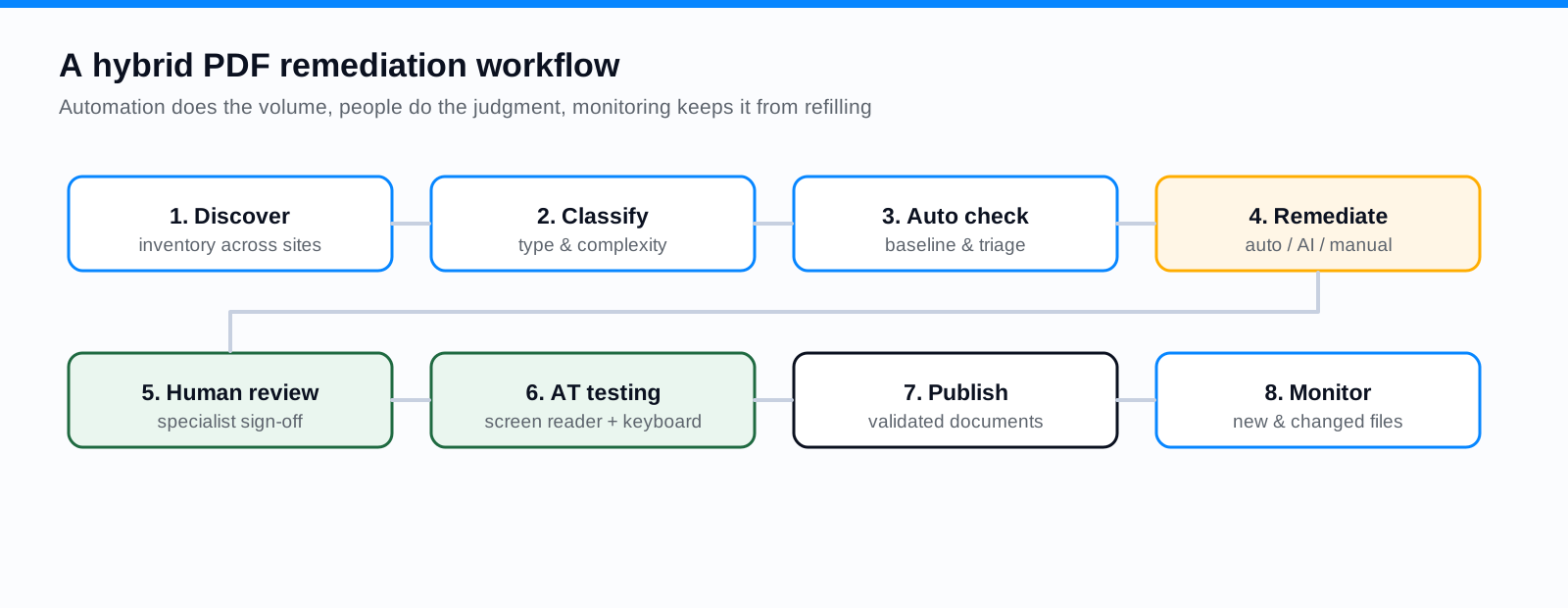
- 1Discover and inventory documents across every site and system.
- 2Classify each file by type and complexity to route it correctly.
- 3Run automated checks to establish a baseline and triage.
- 4Apply the appropriate remediation: automated for simple files, AI-assisted for messy ones, manual for the complex and high-stakes.
- 5Conduct human review of the remediated output.
- 6Test with assistive technology, keyboard and screen reader, on high-impact documents.
- 7Publish validated documents.
- 8Monitor for new and updated content so the backlog does not refill.
How to Evaluate a PDF Remediation Solution
- WCAG 2.1 AA capabilities: does it address tags, reading order, alt text, tables, and forms, not just metadata?
- Quality and transparency: can you see what was changed and why, and inspect the output?
- Human review: does the workflow route documents to a specialist, or does it claim to finish without one?
- Complex documents: how does it handle scans, multi-column layouts, and interactive forms?
- Audit trail and reporting: can you show leadership and, if needed, an investigator what was remediated and when?
- Data security and privacy: where are your documents processed and stored?
- Integration: does it fit your CMS and publishing process, covered in implementation?
- Total cost and maintainability: including the human review the tool still requires.
Where Keyspider Fits
Keyspider's PDF Accessibility AI is built for the hybrid pattern above. It discovers documents across your sites, assesses them, and does the repetitive structural work, tagging, reading order, and draft alt text, at machine speed, then routes the output to a specialist for review rather than claiming to finish on its own. You get an audit trail of what changed. Where a document would serve residents better as a web page than a file, PDF to Page rebuilds it as structured, accessible HTML and removes it from the remediation queue entirely. A real deployment is written up in our bulk PDF remediation case study, and the broader approach to AI plus accessibility is in the WCAG and AI search whitepaper.
Frequently Asked Questions
Can AI make every PDF WCAG compliant automatically?
No. AI assistance speeds up and improves the draft, especially on messy or complex layouts, but it cannot guarantee conformance on its own. Complex tables, meaningful alt text, and interactive forms still need human review and assistive-technology testing. Treat any claim of fully automatic compliance with skepticism.
When is manual remediation still needed?
On complex, high-stakes documents, intricate tables, interactive forms, dense legal filings, and for the final sign-off on everything else. The goal is to spend scarce specialist hours where judgment is required, not on simple files automation handles well.
How should remediation quality be measured?
By the result, not the effort. Validate against WCAG 2.1 AA with a combination of automated checks and manual screen reader and keyboard testing, and track defects found in QA over time to confirm the process is improving.
What should a government agency ask a vendor?
Ask what the tool actually changes, whether a human reviews the output, how it handles scans and forms, what audit trail it produces, where documents are processed, and what the total cost is including the human review. Be wary of guaranteed-compliance claims and single-number performance promises.
Related reading
Want to see the hybrid workflow on your own documents? Book a demo and we will crawl your archive, remediate a sample automatically, and show you exactly where human review takes over.
Ready to see it in action?
Book a demo and we'll configure Keyspider on a live sample of your content, within 48 hours.
Book a Demo