

10,000 PDFs, One Deadline: How to Prioritize Remediation
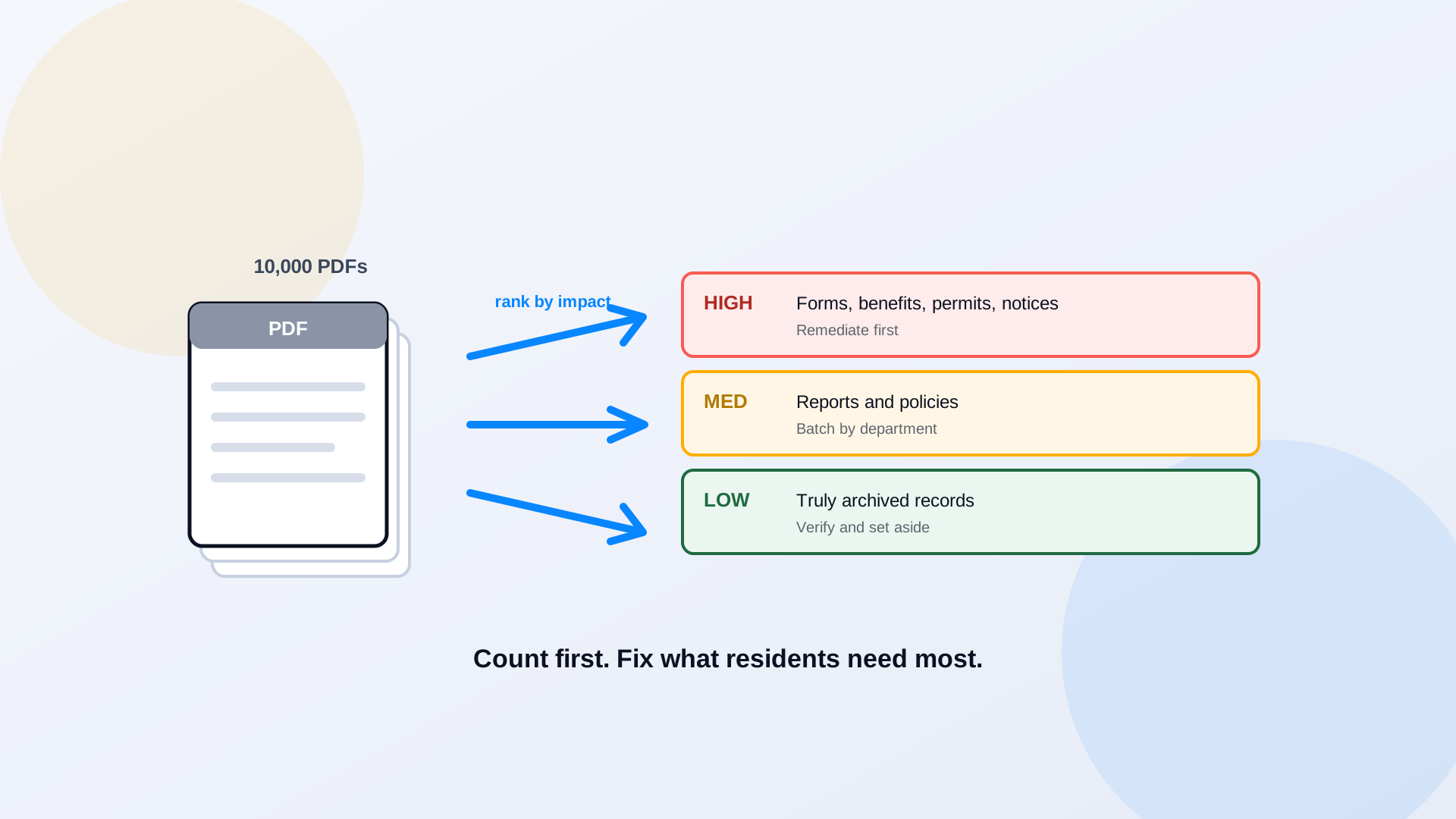
The number is always bigger than anyone guesses. A mid-size city crawls its own site expecting a few hundred PDFs and finds nine thousand. A university adds up the department subsites and clears thirty thousand. The WCAG 2.1 AA deadline does not care about the size of the pile, and no team hand-fixes its way through it in alphabetical order. The agencies that make the deadline do one thing differently: they count first, then remediate in the order that matters to residents, not the order the files happen to sit in.
Why PDF Accessibility Becomes a Large-Scale Problem
A government website is rarely one website. It is a main CMS, a dozen department subsites, a records portal, a meeting-management system, and a few folders nobody has logged into since 2019. Documents accumulate across all of them, published by people who have since changed jobs, in formats that range from clean exports to decade-old scans. Add the fact that new files go up every week, agendas, notices, forms, and the backlog is not a fixed target. It grows while you work on it. That is why this is an operations problem, not a one-time cleanup.
Start With a Document Inventory
You cannot prioritize what you have not counted. The first deliverable is an inventory: a list of every published PDF with enough detail to make decisions. For each file, capture the URL, the title, the owning department, the publish date, the document type, and whatever an automated check can tell you about its current state. The inventory will not be perfect, crawlers miss documents behind logins or buried in systems they cannot reach, so note the coverage gaps and plan a second pass. But even an imperfect count turns a vague dread into a real number you can budget against. We walk through the first moves in are your government PDFs accessible.
Prioritize by Public Impact and Applicable Obligations
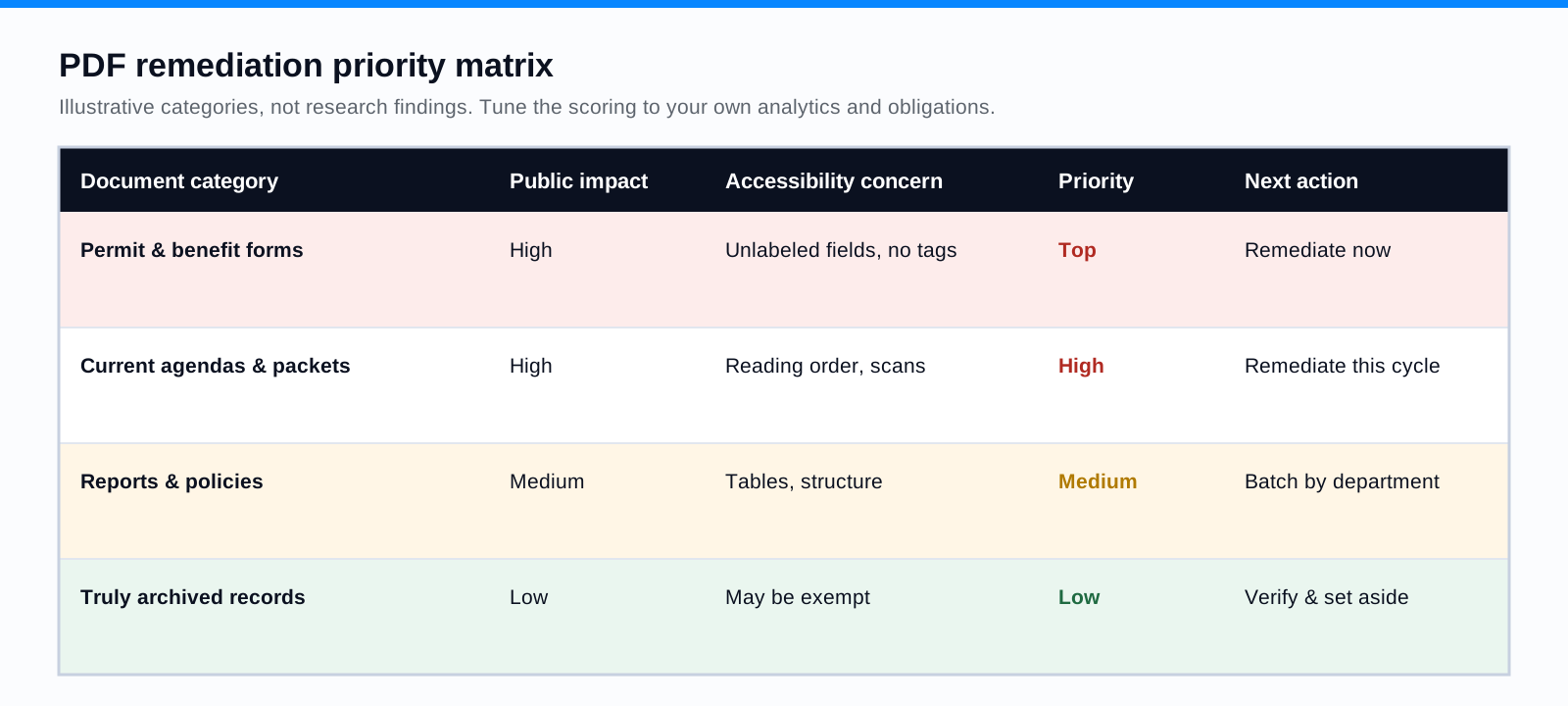
Not every document deserves the same urgency. The files that move to the front are the ones residents use to obtain a service: permit and license applications, benefit forms, tax notices, emergency information, essential policies. Next come the high-traffic documents, whatever your analytics show people actually open. Complexity and effort factor in too, a simple two-page form is a quick win, a 200-page scanned report is a project. Prioritization is a management strategy for sequencing the work; it is not a legal determination about which documents are in scope. Decide what to fix first, and keep your counsel in the loop on which documents carry obligations.
Develop a PDF Remediation Priority Matrix
A simple matrix keeps the whole team ranking documents the same way. Score each category on public impact and on remediation effort, then let the combination set the order of work and the next action.
Build a Repeatable Remediation Workflow
Once the order is set, the work should flow through the same pipeline every time, so quality does not depend on who happens to pick up a file. A workable pipeline has seven stages: discover documents across every site, classify them by type and complexity, run an automated assessment, remediate, put the result through human quality assurance, publish, and monitor for new or changed files. The last stage is what stops the backlog from quietly refilling, which is its own discipline covered in keeping new PDFs in compliance.
Where Automation Helps and Where People Are Needed
Automation is strongest on the parts of the job that are repetitive and mechanical: discovering documents at scale, classifying them, running consistent checks, applying OCR, and drafting the structural tagging and reading order on straightforward files. People are irreplaceable on the parts that require judgment: a complex table where the header logic is ambiguous, a chart that needs alt text conveying the right point, a scanned form that has to become keyboard-operable, a reading order a model got backward. ADA Audit runs exactly that discover, classify, assess, and remediate pipeline across an archive and routes the complex files to a specialist, while PDF to Page converts documents that belong on the web into accessible HTML instead. The pattern that scales is automated remediation feeding human validation, which we compare head to head in manual versus AI-assisted workflows. A real deployment of that pattern is in our bulk PDF remediation case study.
Measure Progress With Meaningful KPIs
- Documents inventoried, and estimated coverage of the true total.
- Documents assessed with an automated check.
- Documents remediated and validated, counted only after human QA.
- Defects found during QA, which tells you whether the upstream process is improving.
- Average remediation time by document type, so you can forecast the rest of the backlog.
- Percentage of priority documents complete, the number leadership should watch.
- Newly published documents that passed the team's quality process before going live.
A 30-60-90 Day Planning Framework
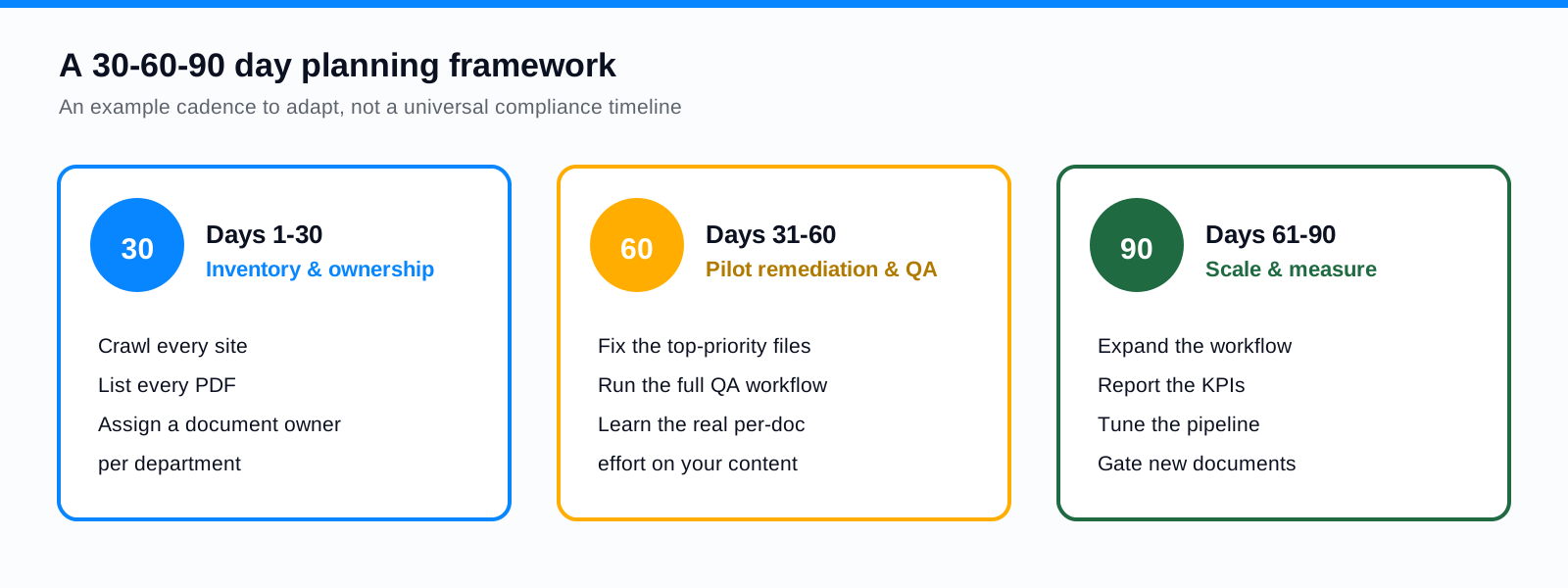
In the first thirty days, build the inventory and assign clear ownership for each department's documents. In days 31 to 60, pilot the full remediation and QA workflow on the highest-priority files, so you learn the real per-document effort on your own content. In days 61 to 90, scale what worked, start reporting the KPIs, and tune the pipeline. Treat this as an example cadence to adapt, not a substitute for your own deadline math under the extended ADA timeline.
Do not remediate in alphabetical order
The single most common mistake is starting at the top of the file list and working down. That spends your scarce specialist hours on whatever happens to be named first, while the benefit application a resident needs today sits untouched in the Ps. Rank by public impact, fix the service documents first, and batch the rest.
Frequently Asked Questions
How do we even start with thousands of PDFs?
Start with an automated crawl to build the inventory, then rank the list by public impact. You do not need a perfect count to begin; you need to know which documents residents use for services, because those move to the front regardless of the total.
Should every document get the same priority?
No. A benefit form and an archived newsletter do not carry the same urgency or the same obligation. Prioritize by public impact and current use, and sequence the lower-impact material into later batches.
Can remediation be automated?
The repetitive parts can: discovery, classification, OCR, and first-pass tagging and reading order on simple files. Complex tables, meaningful alt text, interactive forms, and final sign-off still need human review and assistive-technology testing.
How do we keep the backlog from coming back?
Put a quality gate on publishing so new documents come out accessible, and run a recurring inventory to confirm the backlog is shrinking rather than silently refilling. Prevention is cheaper than a second remediation project.
Related reading
Want a real count of your document backlog and a priority-ranked plan to clear it? Book a demo and we will crawl your sites, size the archive, and show the workflow. Cities and counties can start with the local government overview; universities, with higher education.
Ready to see it in action?
Book a demo and we'll configure Keyspider on a live sample of your content, within 48 hours.
Book a Demo