

Visual Metadata Mapping
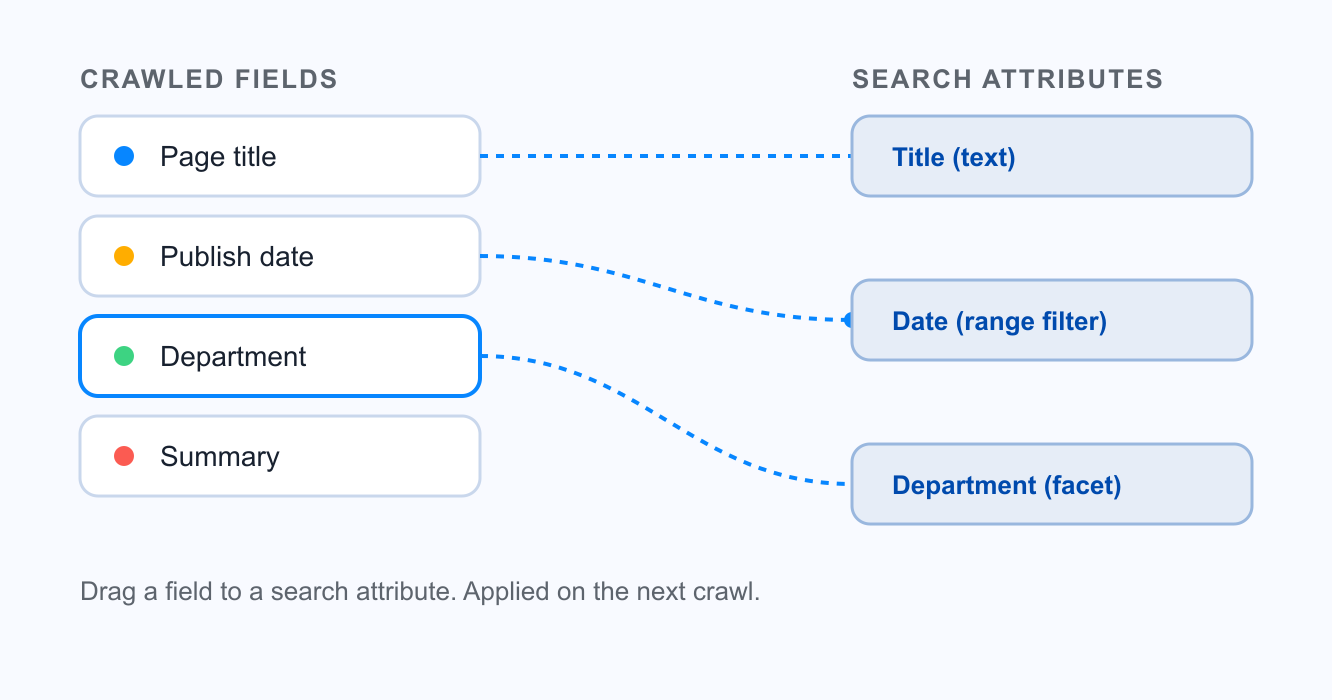
Open a sample page from your site and the crawler shows you everything it pulled. The title. The publish date. A department name. A dozen custom attributes you forgot were even in the template. Drag each one to where it belongs in search, set its type, and save. The next crawl applies your choices across the whole collection, and your web team owns the change from start to finish without filing an engineering ticket or waiting on a deploy.
How it works
Pull a sample page
Point the mapper at any URL in a collection. Keyspider renders that page and lists every field it found, from standard meta tags to the custom data attributes buried deep in your templates.
Assign each field
Drag the publish date onto the date attribute. The office name onto a department facet. The summary onto the description slot. Set the type as you go, so a number stays sortable and a date stays a date.
Apply across the collection
Save once and the mapping covers every page in that collection on the next crawl. Open the query tester, check three results, and you're done.
Use cases
University sites
A faculty directory exposes name, title, department, and office hours as separate fields. Map them once and every people result shows the right details inline, across every subsite.
Government document libraries
Agendas carry a meeting date, a committee, and a document type. Map those three and residents filter by date range and committee, without anyone retagging a single PDF.
News and events
An events feed has a start date, a venue, and a category. Mapped correctly, past events drop off on their own and the category becomes a facet people actually click.
Ready to give your users better answers?
AI Search, AI Assistant, and Workplace Search. Deployed in days, not months. See it live on your own content.
No credit card required · Live in 2 weeks · Cancel anytime