

Result Descriptions
The line of text under a search result decides whether someone clicks or scrolls past. Most search tools hand you whatever the meta description happens to say, which on a government site is often nothing, or a 2019 boilerplate about cookie policy. Keyspider lets you decide. Map several fields to the description slot in the order you want them tried, and every result gets a snippet that actually describes the page.
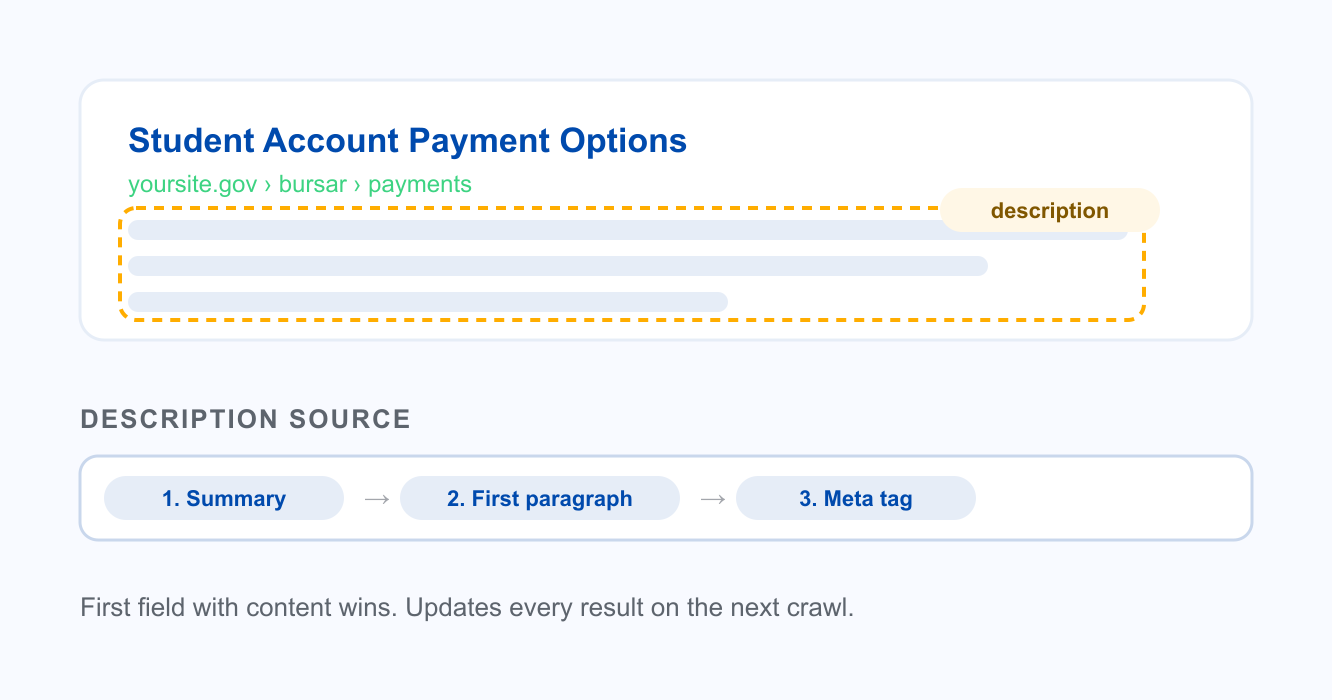
How it works
Pick the fields that describe the page
For an event, that might be date, venue, and a one-line blurb. For a staff profile, the role and the department. You choose which fields carry the meaning for that content type.
Set the priority order
List the fields from best to fallback. Keyspider uses the first one that has content, so a page with no summary still gets a useful snippet from the next field down.
Remap when a set of pages reads poorly
Notice a section with weak snippets? Point its description at a better field and every result in that section updates on the next crawl. Nobody edits a single page.
Use cases
Policy and bylaw pages
Long legal pages rarely carry a meta description. Map the first paragraph or a summary field instead, and residents see what the policy covers before they open a forty-page PDF.
Staff and faculty directories
A name alone tells a visitor nothing. Combine title and department into the snippet so a search for 'bursar' shows the role and office right in the result.
Course catalogs
Course results read better with the credit count and the term pulled into the description, so students compare options without clicking into each one.
Ready to give your users better answers?
AI Search, AI Assistant, and Workplace Search. Deployed in days, not months. See it live on your own content.
No credit card required · Live in 2 weeks · Cancel anytime