

AI Search vs AI Chatbot: Which One Belongs on Your Government Website?
You have probably sat through the pitch for AI search. You have also sat through the pitch for AI chat. Both pitches sound similar. Both mention retrieval, grounding, and citations. And both vendors claim their tool is the one your residents actually want. The frustrating part is that both are often right, for different tasks.
Government agencies are getting stuck on this decision for the wrong reason. The vendors have made the categories sound overlapping. In reality, AI search and AI chat solve two different jobs on your website. Most large agencies will end up deploying both. What matters is knowing which one to start with, and what each is actually good at.
The Short Answer
Rule of thumb
AI search is what happens when a resident types into the search box. AI chat is what happens when a resident opens a conversation window. Search handles look-up tasks. Chat handles guided help. If most of your residents come to your site knowing what page they need, start with search. If most come confused about what they need at all, start with chat.
What AI Search Actually Does
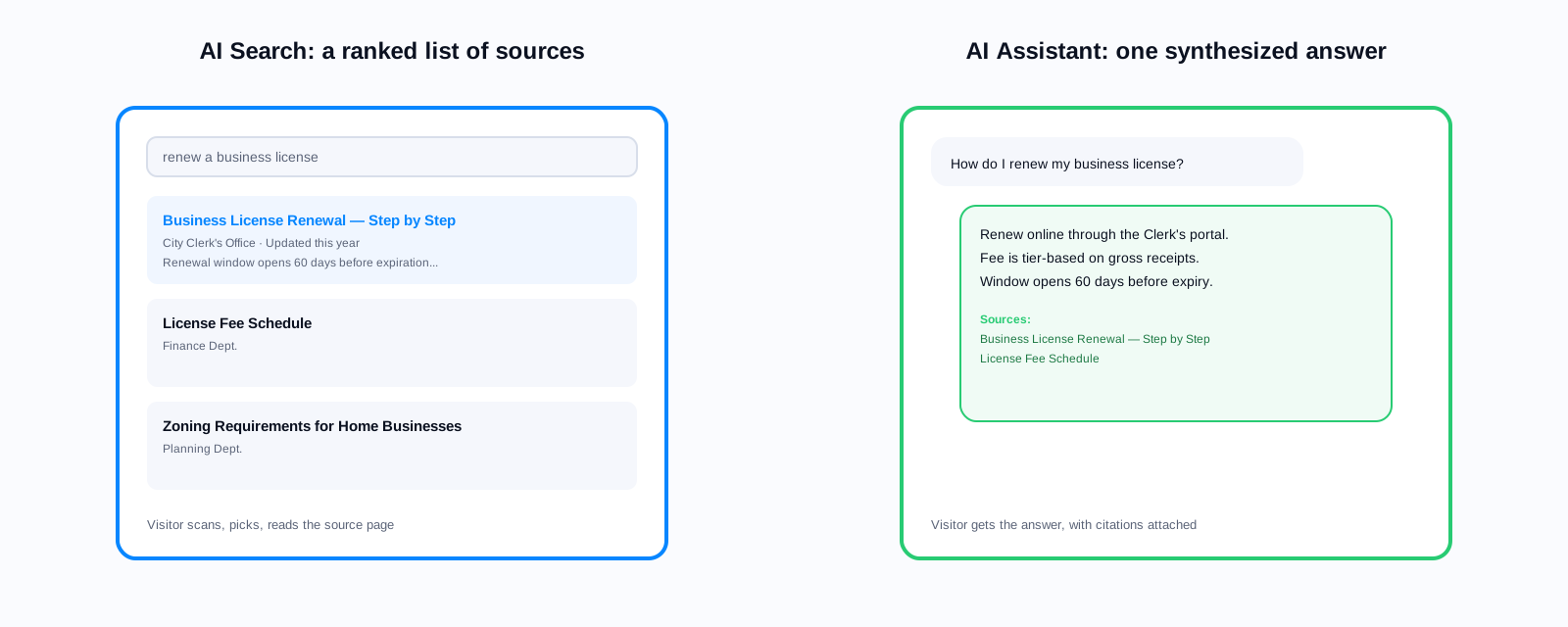
AI search replaces your existing site search bar. A resident types a query, and the AI returns the most relevant pages, documents, and content from your website. The difference from traditional search is that the AI understands what the resident meant, not just which words they typed. A resident searching for 'help paying rent' gets rental assistance program pages, not a keyword match on the word 'help'.
Modern AI search also returns a synthesised answer at the top of the results, generated from your content and cited back to the source pages. A resident asking 'when do property tax payments become delinquent' sees the answer directly, plus links to the underlying policy pages so they can verify and read further.
The core value of AI search is speed. A resident who knew what they were looking for gets it in one interaction instead of three. A resident who did not quite know how to describe what they wanted gets guided to the right page anyway. And every zero-result query is now a signal you can use to improve your content, rather than a dead end.
What AI Chat Actually Does
AI chat is a conversation window on your website. A resident opens it, types a question in their own words, and gets a conversational answer. The AI can ask follow-up questions, clarify what the resident is trying to accomplish, and stitch together information from multiple pages into a single response. If the resident asks a related follow-up, the AI remembers what they already discussed.
The core value of AI chat is guidance. A resident who does not know what they need, or who has a question that spans several pages of your site, gets a coherent walk-through instead of a list of links. It handles the class of interaction that would otherwise become a phone call to your contact center.
The Job-to-Be-Done Test
The clearest way to pick between them is to look at what your residents are trying to do when they arrive on your site. Look at your search analytics and your phone call topics for the last 90 days. Categorize the top 100 by job type.
Look-up Jobs
These are questions where the resident already knows the answer exists and just needs to find it. Examples: 'what is the property tax rate', 'when does the library open on Sunday', 'what is the phone number for the parks department'. Look-up jobs are what AI search handles best. The resident wants speed, not conversation.
How-do-I Jobs
These are questions where the resident knows what they want to accomplish but not the steps. Examples: 'how do I apply for a food handler permit', 'how do I appeal a parking ticket', 'how do I register my dog'. These sit in the middle. AI search with answer synthesis handles many of them. AI chat handles them better when the process spans multiple pages or when there are prerequisites the resident does not know about yet.
Am-I-Eligible Jobs
These are questions where the resident does not yet know if a service applies to them. Examples: 'do I qualify for the low-income energy assistance program', 'is my property in the flood zone', 'can my child ride the bus to their new school'. These are chat jobs. They usually require the AI to ask follow-up questions, understand the resident's specific situation, and give a personalized answer.
What-Do-I-Do Jobs
These are open-ended situations where the resident does not know what agency, program, or service to look for. Examples: 'my landlord is threatening to evict me', 'I lost my job', 'my elderly parent needs help staying in their home'. These are chat jobs, and they are the ones your phone lines are absorbing today. Chat handles them by understanding the situation, routing to the right services, and warm-handing off to a human when needed.
68%
of government website visits start with the search box
22%
of website visitors open a chat window when one is available
$4.80
average cost per contact-center call, versus near-zero for AI-handled interactions
3–4×
faster task completion with AI search than with keyword search
78%
of chat conversations completed without human escalation in benchmark deployments
42%
of residents use both the search bar and the chat window in the same session
Cost Comparison
AI search and AI chat have different pricing structures because they carry different infrastructure loads. AI search runs on every query, so pricing is typically indexed to query volume and content volume (how many pages the AI has to know about). AI chat has longer sessions with multiple back-and-forth turns per user, so pricing is often indexed to session count or turn count.
For most mid-sized city and county governments, AI search costs somewhere in the low five figures annually. AI chat costs somewhere in the mid to high five figures annually. The exact ratio depends on your traffic. What matters more than the sticker price is what each replaces. AI search often replaces a separate site search license (Google Search Appliance was retired, Elasticsearch requires staff time, and most legacy tools cost money too). AI chat often replaces phone interpretation costs, contact center headcount expansion, or both.
The Failure Modes You Need to Know
AI search fails when residents ask a question the AI has never been asked before and no content on your site addresses it. The failure mode is a low-relevance result set with a synthesised answer that hedges. The resident leaves. This is a soft failure. They still had a chance to browse.
AI chat fails harder. When chat cannot answer a question, the resident has already committed to the conversation. If the chat refuses to answer, or answers wrong, or loops without progress, the resident feels stuck. This is why grounding, citation, and human escalation paths matter so much more for chat than for search.
We deployed chat first because it was the shinier product. What we learned in the first three months was that search was actually the higher-leverage change. Search touches 70% of our visitors. Chat touches 20%. Both matter, but if we had done the sequencing again we would have started with search and added chat six months later.
IT director, county government, Pacific Northwest
When to Deploy Both
Most larger government agencies end up deploying both. The pattern that works is search first, chat second, with an integration that lets the search results page offer a chat handoff for anyone who wants a conversation instead of a list of links.
The two together produce a compounding effect. Search handles the 70% of visitors who arrive knowing what they need. Chat handles the 20% who need guidance. The remaining 10% either browse or bounce, and both AI systems generate analytics that help you improve the content those visitors were looking for.
Procurement Sequencing
If you have budget for one product this fiscal year and another next fiscal year, the sequence that most agencies get value from is: start with AI Search in year one, add AI Assistant in year two. Search touches the largest share of your visitor traffic and often has the fastest measurable impact on contact center call volume. Chat compounds on top of search once your team has the operational muscle for both.
If you have the budget for both immediately, deploy them together on a pilot basis for 60 to 90 days before rolling out sitewide. Use the pilot to answer three questions: which tool residents actually reach for first, which is producing the higher-value task completions, and which staff process changes each requires.
The wrong reason to skip search
Some agencies deploy chat first because the demos are more impressive. A chat demo shows a natural conversation. A search demo shows a list of links with a paragraph on top. The demo is not the value. Search has larger reach and lower cost per interaction. Do not let the demo shape the sequencing.
Related reading
Next step
Pull the top 100 search queries and top 100 phone call topics from your agency for the last quarter. Sort each into look-up, how-do-I, am-I-eligible, and what-do-I-do buckets. The distribution tells you which product to lead with.
Book a demo and we'll show you both products running on a sample of your own content.
Ready to see it in action?
Book a demo and we'll configure Keyspider on a live sample of your content, within 48 hours.
Book a Demo