

From Scan to Service: When OCR Is Not Enough for PDFs
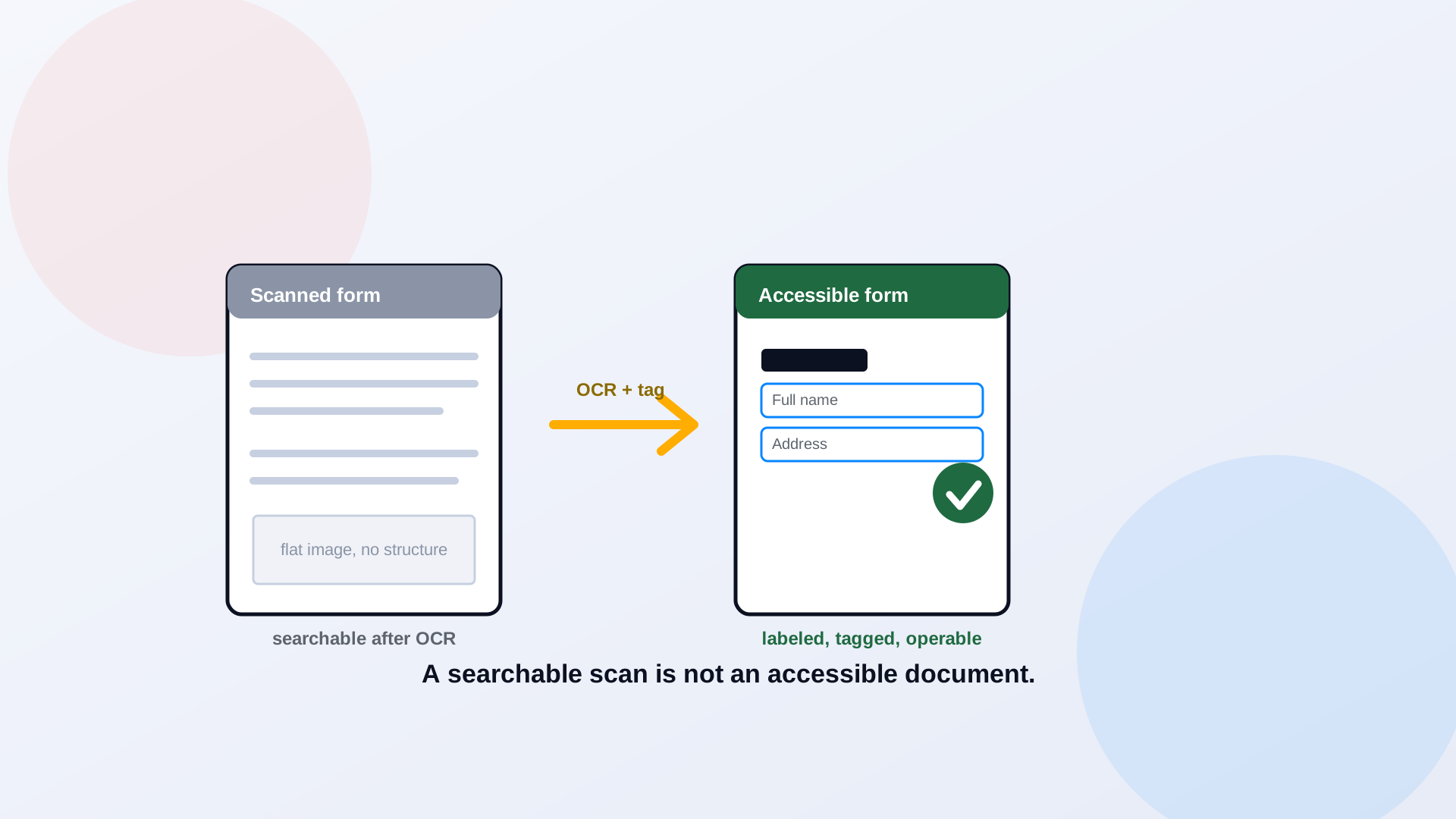
Run a scanned form through optical character recognition and something satisfying happens: you can suddenly select the text, search it, copy it. It feels fixed. It is not. OCR solves the problem of a document being a flat picture; it does nothing about the document being unstructured. A screen reader still has no headings to navigate, no reading order to follow, no labels on the form fields, no description of the seal in the corner. A searchable PDF and an accessible PDF are two different things, and the gap between them is where scanned government documents quietly fail.
The Difference Between a "Searchable PDF" and an "Accessible PDF"
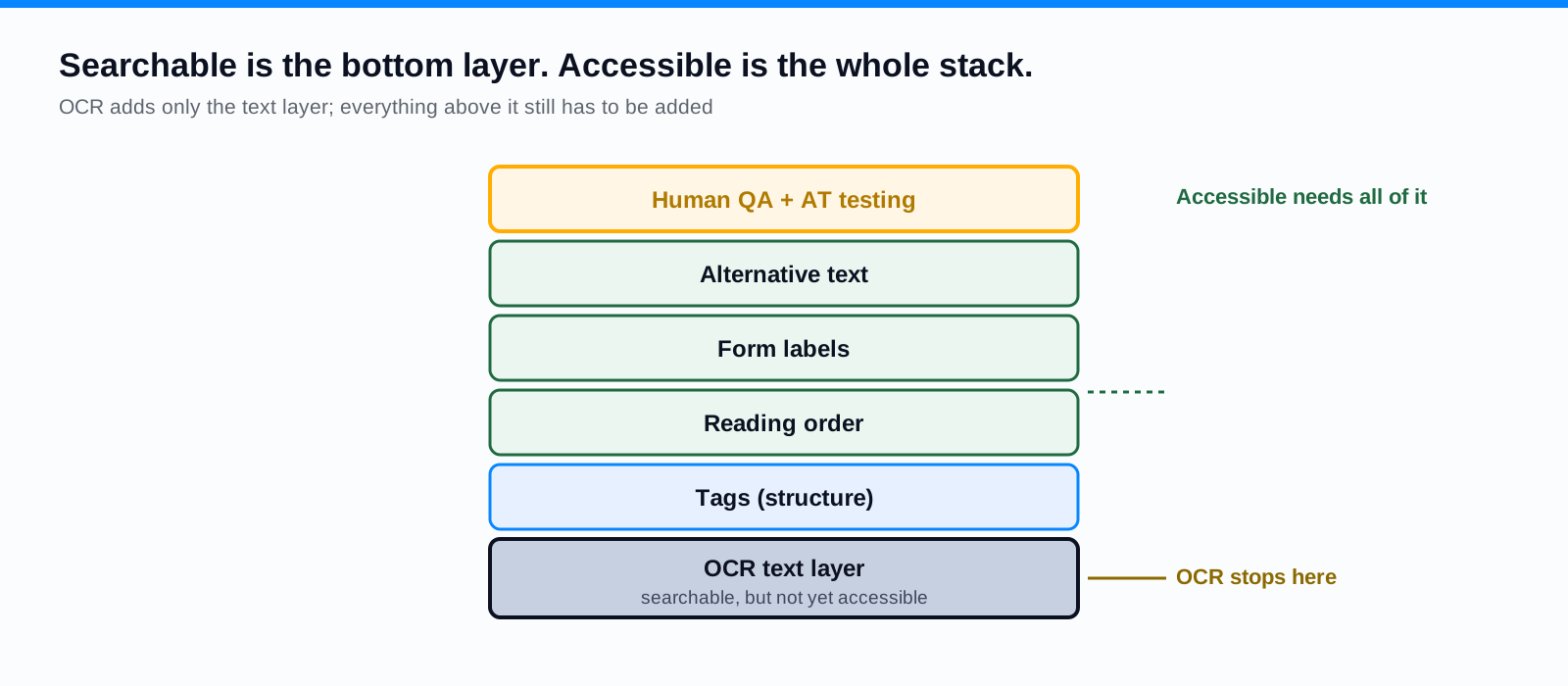
A searchable PDF has a text layer: the words exist as characters a machine can find. An accessible PDF has structure: tags that name each element, a defined reading order, text alternatives, labeled form controls, and navigable headings. OCR delivers the first and barely touches the second. You can have a fully searchable document that a screen reader reads as one undifferentiated wall of text, with the footer landing in the middle of a sentence and the form fields announced as nothing at all. Searchable is a feature for people who can already see the page. Accessible is what the people who cannot see it need.
What OCR Fixes, and What It Does Not
OCR is a real and necessary step for any scanned document. It converts the image to text, which makes remediation possible at all and makes the content searchable. What it does not do is add tags, set reading order, identify headings, write alternative text, label form fields, or fix tables. Worse, OCR introduces its own errors: a smudged digit read wrong, a two-column page merged into one run of words, a signature interpreted as letters, a form field swallowed into the surrounding text. The output always needs checking against the original. Treat OCR as the first stage of remediation, never the whole of it.
A Remediation Workflow for Scanned Documents
Scanned documents follow a specific path. Run OCR, then check the recognized text against the original for errors, paying special attention to numbers, names, and dates where a misread is both likely and consequential. Add the tag structure: headings, paragraphs, lists, tables, figures. Set the reading order to match how a person reads the page. Add alternative text for any meaningful images, including scanned logos, seals, and signatures that carry information. Label every form field. Then validate, which is a job for a human, not a checker alone, as we cover in can a screen reader user actually use it. The full tagging method is in how to remediate a PDF for WCAG 2.1 AA.
When Rebuilding in Word or HTML Is Faster and Better
Sometimes the fastest accessible result is not repairing the scan at all. If you still have the source file, a Word document or the original export, fixing accessibility there and regenerating is often quicker and cleaner than tagging a scan field by field. And for many documents, the better destination is not a PDF at all. A notice, a policy, or an informational page usually serves residents better as a web page: responsive on a phone, searchable by your site, and accessible by default when built well. PDF to Page rebuilds documents as structured HTML for exactly this reason, taking them out of the scan-remediation queue entirely. Ask, for each heavily scanned document, whether it needs to be a PDF at all.
Making Scanned Forms Keyboard and Screen-Reader Usable
Scanned forms are the hardest and the most important case, because a form is something a resident has to complete, not just read. A flat scan of a form has no interactive fields at all; after OCR it still has none. Making it usable means adding real form controls, giving each a programmatic label a screen reader will announce, setting a logical tab order so keyboard users move through the fields in the right sequence, and providing clear instructions and error handling. Forms are involved enough that we gave them a dedicated guide; the short version is that a scanned form almost always deserves to become a real web form.
Quality Assurance: Automated Checks Plus Human Testing
Finish every scanned document the same way: an automated check to catch the mechanical gaps, then a human pass that the automation cannot do. Read the OCR output for recognition errors. Listen to the document with a screen reader to confirm the reading order and the tags hold up. Tab through any form with the keyboard alone. A scanned document that cleared OCR and an automated checker can still be unusable, which is precisely why the manual stage is not optional.
Frequently Asked Questions
Does OCR make a PDF accessible?
No. OCR adds a searchable text layer, which is necessary but not sufficient. Accessibility also requires tags, reading order, alternative text, labeled form fields, and correct tables, none of which OCR provides. OCR is step one of remediation.
Is a searchable PDF the same as an accessible PDF?
No. Searchable means the text can be found by a machine. Accessible means a person using assistive technology can navigate and understand the document. A PDF can be fully searchable and still unusable with a screen reader.
Should we fix the scan or rebuild the document?
It depends on complexity and whether you have the source. For simple documents with an available source file, rebuilding and regenerating is often faster. For informational content, publishing as accessible HTML is frequently the best option. Reserve in-PDF repair for documents that must stay PDFs and have no usable source.
How accurate is OCR on government forms?
Accuracy varies with scan quality, fonts, and layout, and errors cluster exactly where they matter: numbers, names, and dates. Always verify OCR output against the original, especially on anything a resident will act on.
Related reading
Sitting on a library of scanned forms and notices? ADA Audit runs OCR, tags, and remediates at scale while routing the hard scans to a specialist, and PDF to Page rebuilds the ones that belong on the web as accessible pages. Book a demo and we will run a sample and show you where OCR stops and remediation begins.
Ready to see it in action?
Book a demo and we'll configure Keyspider on a live sample of your content, within 48 hours.
Book a Demo